Reversing a Golang challenge
Lately I have been doing some more Reversing challenges. I started doing some HTB challenges. I bought a HTB VIP suscription so I’m trying to do as much as I can to do Sherloks (Blue team) and machines (Red team) :)
Antartica
This is a medium challenge, sadly this is a VIP+ challenge, meaning that you have to pay to play. At first I chose to try this challenge because I was working on beating all the medium sherloks.
Static Analysis
When I downloaded the files and did the starting triage steps I was left hearbroken because this is a Linux binary. Because I’m too lazy to setup a proper Linux virtual machine to do Dynamic Analysis I will reverse this using just Static Analysis tools on my ARM mac to make sure I cannot run this binary even on accident.
1
2
3
4
5
6
7
$ file antarctica.malware

antarctica.malware: ELF 64-bit LSB executable, x86-64,
version 1 (SYSV), dynamically linked,
interpreter /lib64/ld-linux-x86-64.so.2,
BuildID[sha1]=9dd41fcf07f375463b2b9b157007d4a884701aaa,
for GNU/Linux 3.2.0, stripped
Detect It Easy
As you can see this is a x86-64 Linux binary so I cannot run this on ARM and or on my x86-64 Windows machine. And the binary is also stripped meaning that a lot of helpful info about the binary was deleted, making this harder for us to analyze.
I used DIE (Detect It Easy) to get a general idea of what I was going to be working with. As a sidenote, this is my first time installing DIE on Mac so I was not sure if I installed the correct binary (9b6411f4976593988fbcdc8d1ed2fd8123996e4b9f4a43df6a841460c229794b) from DIE-Engine.
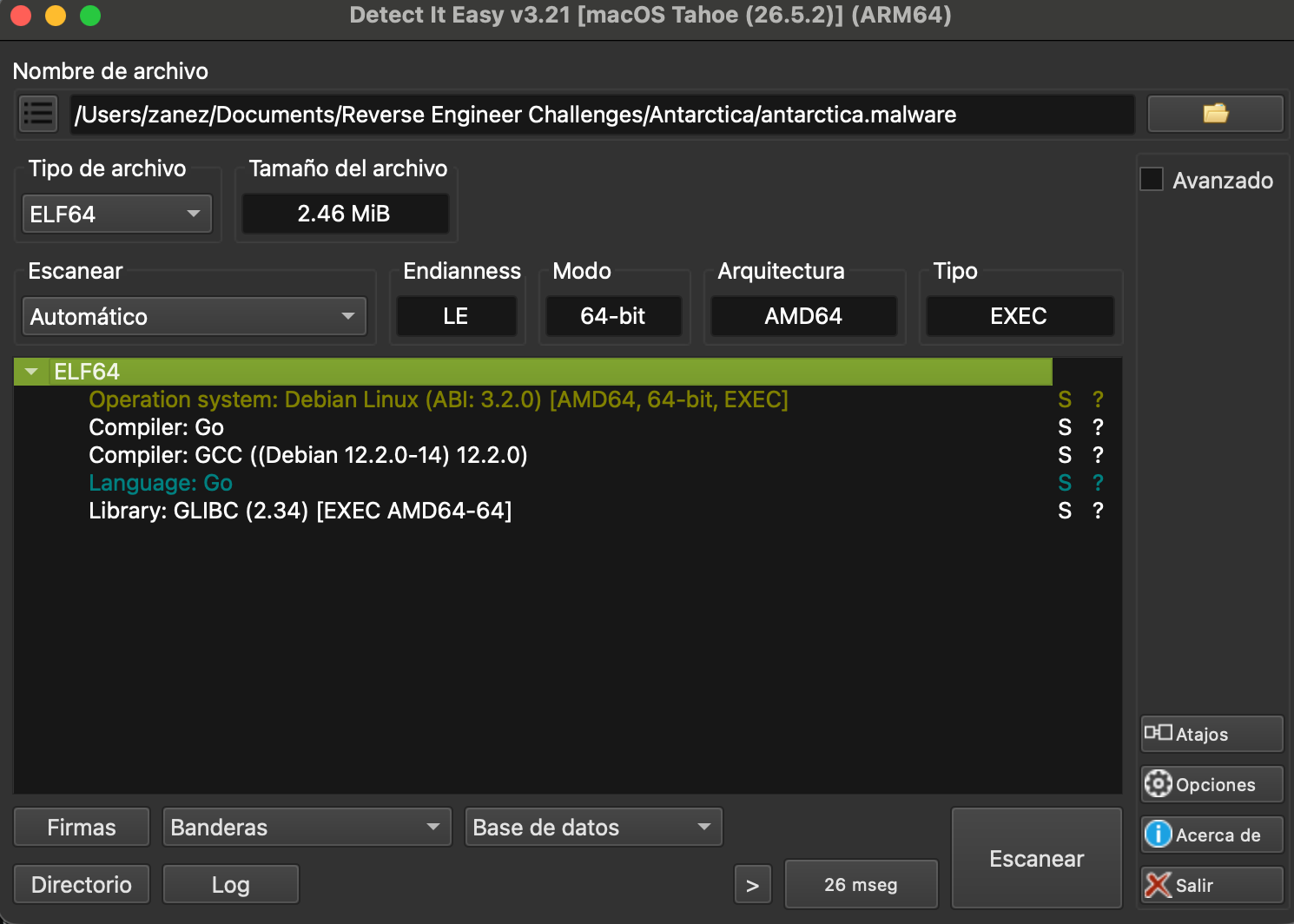
After seeing the Golang compiler mentioned I knew this was going to be a pain to reverse engineer. So instead of using Binary Ninja as I usually do I will be using IDA. I believe IDA has better time dealing with Golang binaries in general. It makes the process so much simpler.
IDA
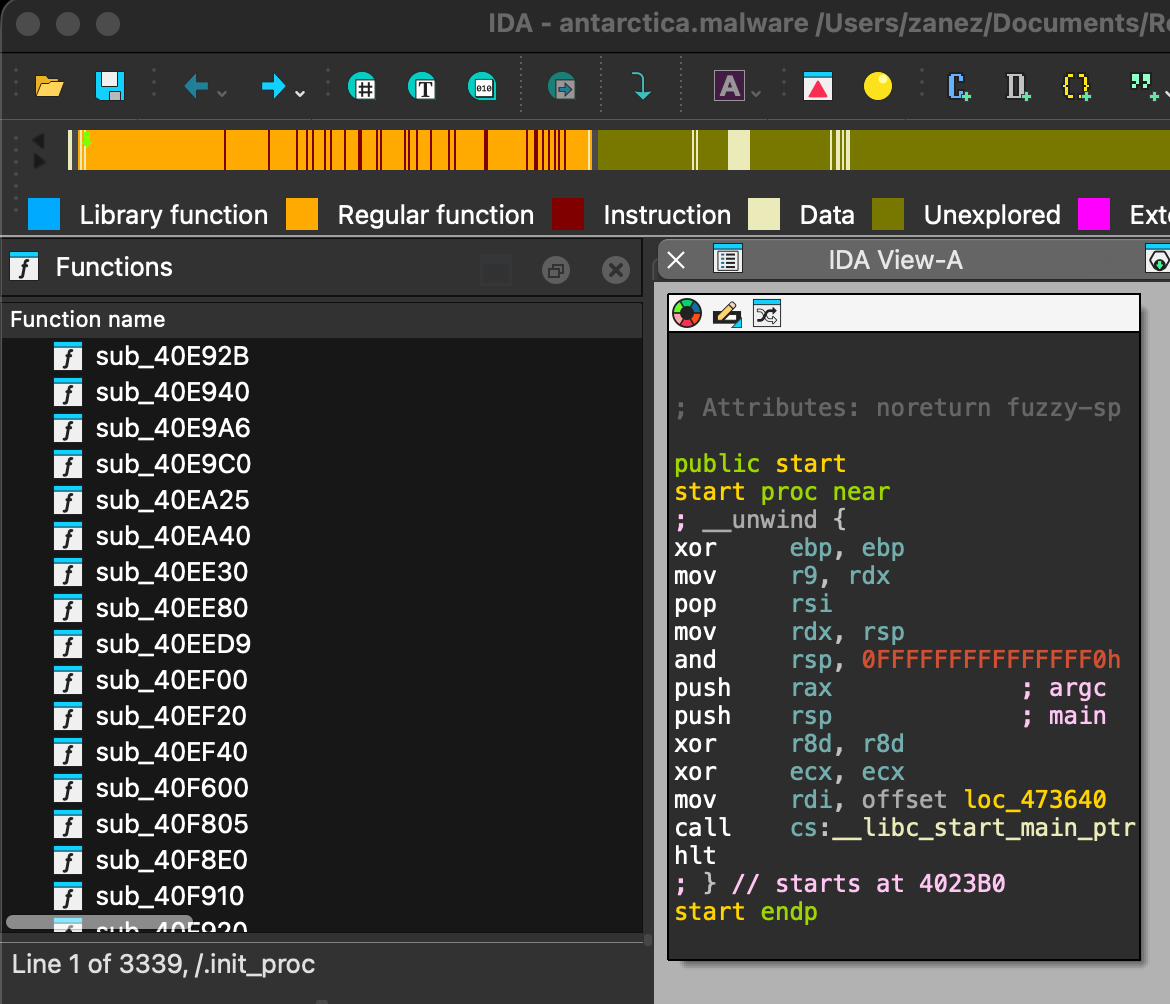
After loading the binary with the default configuration that was recommended by IDA I see that indeed this is stripped. The first thing I see is that I’m not in the main function of the binary. I’m at the very start of the setup of the program. And all the list of functions are sub_address So even IDA is having some issues with this binary.
What about the strings? It’s something that I always use to know if there is any sort of encryption to obfuscate the inner workings of the malware. Luckly I see multiple strings, some of them are functions used by the malware, some are errors and some appear to be used for the workflow.
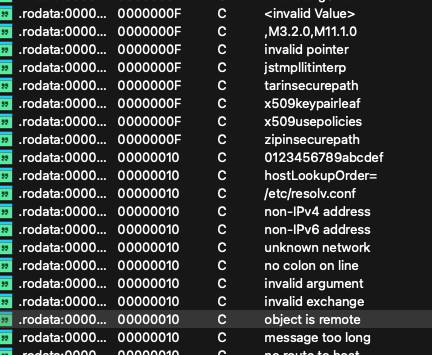
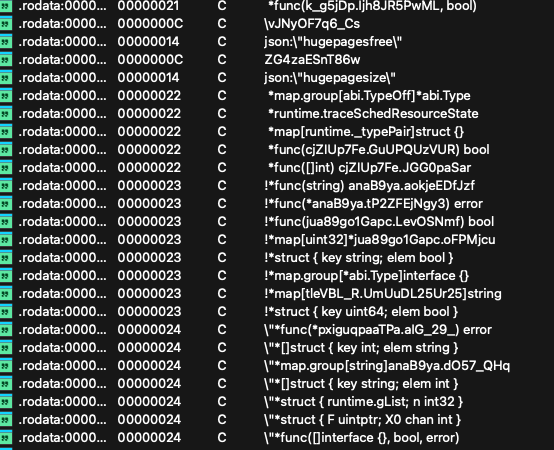
You could look for some interesting that might reveal some important information about the binary, if you somehow find a string that is used for the malware workflow, such as a string that is used to look for a file, folder or for C2 you could go to the assembly and look for the main function this way.
GoReSym - Searching for the main
Instead I will use GoReSym which is a Golang symbol recovery tool made by Mandiant. You can download it from GitHub or from a package manager like I did.
1
$ goresym -d antarctica.malware > antarctica_symbols.txt
This command will get me user package names and standard Go package names. And the output will be saved to a txt file for easier access. After the command is done, I check the output and search for the string main.main because this is the real entry point of the Golang binary.
1
2
3
4
5
6
{
    "Start": 5222016,
    "End": 5222208,
    "PackageName": "main",
    "FullName": "main.main"
}
I jump to that address in IDA and I see the following function:
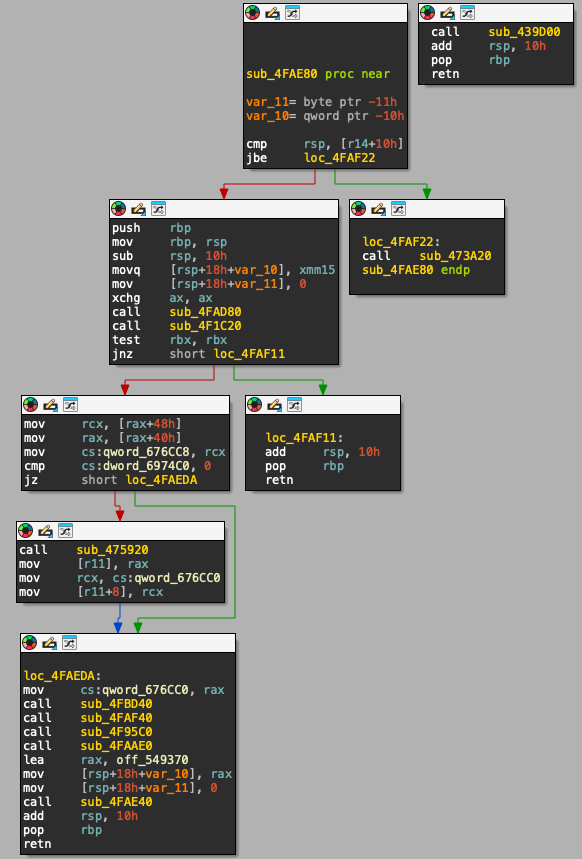
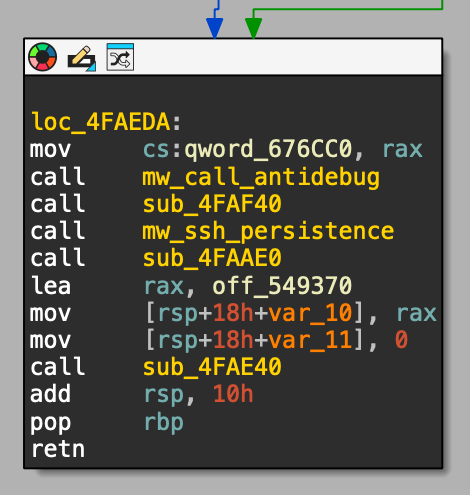
I will only analyze the left branch, the other two right branches are only used for exiting the program. You can see the pop instructions and a retn and in the other branch there is the endp marker.
Question 2
If we go to the first call instruction (call sub_4FAD80) we can see the use of the string /tmp/file.lock if you have analyzed malware before you know this is a very common technique that is often used to stop the malware from having multiple instances running on the same device.
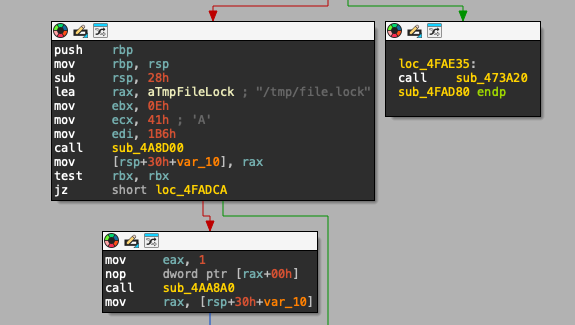
Now, this function looks could be creating, reading, writing or just checking if the file exists on the filesystem. After looking for a while for the correct function the API call open() is very similar to what we can see:
1
2
3
4
5
6
int open(
    const char *path,
    size_t path_len,
    int flags,
    int mode
);
If we translate the hex to decimal numbers we can see something like this:
1
2
3
4
5
lea     rax, aTmpFileLock ; "/tmp/file.lock"
mov     ebx, 14
mov     ecx, 65
mov     edi, 666o
call    open
The value in exc is 0x41 = 65, which correspond to the flags O_WRONLY, O_CREAT. This means that the malware is requesting opening the file with read-only and write-only. And the last register edi is 0666 which are the Linux permissions rw-rw-rw.
- Question 2: The malware creates a lock on a file to ensure that only one instance of it is running. What is the full path of that file?
/tmp/file.lock
Question 3
Next, we can go ahead and analyze the rest of the functions, specially this block of code. This is obviously something that looks suspicious because it resembles code snippets that do function calls from main, something similar to this:
1
2
3
4
5
6
int main() {
    searchFolders();
    createArrayFiles();
    encryptFiles();
    return 0;
}
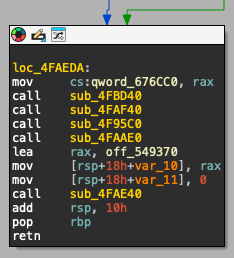
We go to the function sub_4FBD40 and from there we go to sub_4FB720. Right away we see that the whole function looks a bit messed up, a lot of code blocks and multiple call instructions on the left branches. You can tell this whole function is important because at the end of the function you see the string /proc/xen which according to the Internet:
Is a compatibility mount point for the xenfs filesystem, which serves as the primary interface between the Xen hypervisor and the guest operating systems
Because of this I started jumping to the functions that were being called to look for possible strings that could be helpful.
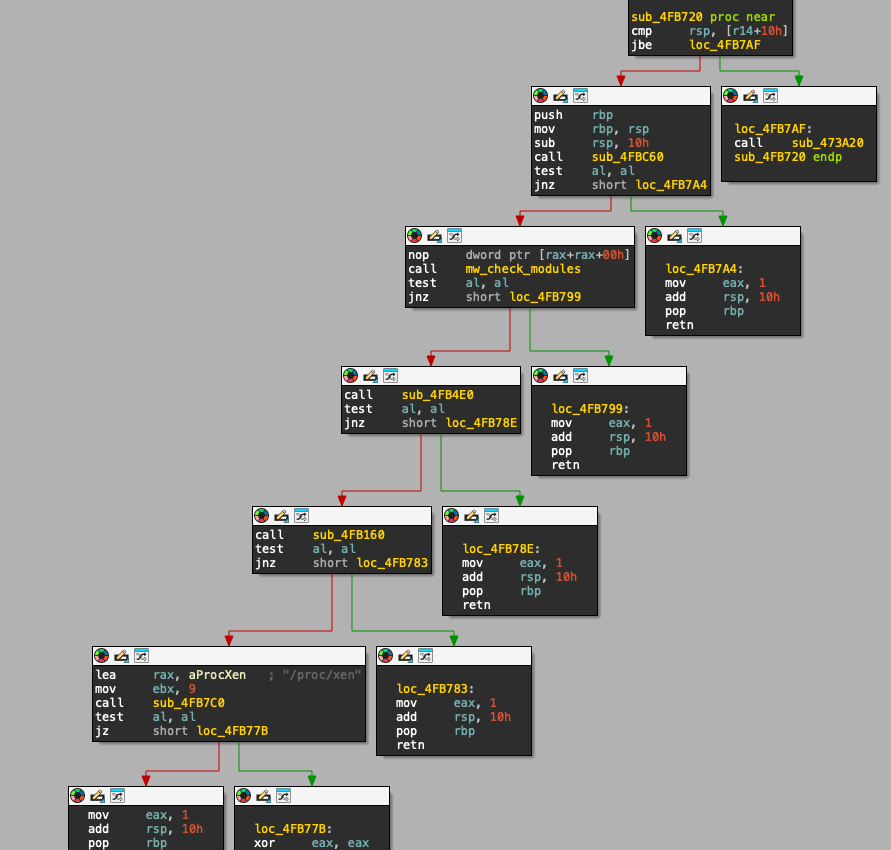
As you can see the previous image I already named this function to mw_check_modules, but the real address is 0x4FB600. I stumbled upon this two very interesting strings "/proc/modules" and "vboxguest".
/proc/modulesis a virtual file in the Linux /proc filesystem that provides a snapshot of all kernel modules currently loaded into the system.
Even if you don’t fully reverse the rest of the call instructions we know that this is being used as an Anti-VM check function and is targeting VirtualBox VMs
Question 4
The next function sub_4FB4E0 appears to be a information gathering function that is verifying the hardware of the computer. This can also be an Anti-VM check that looks for specific CPUs to catch virtualized CPUs.
The call to sub_4FA6E0 seems to be using that for some more checks, unfortunately this is one of those functions that are too stripped and complex to do a simple static analysis on. So I rename this function to mw_cpu_info
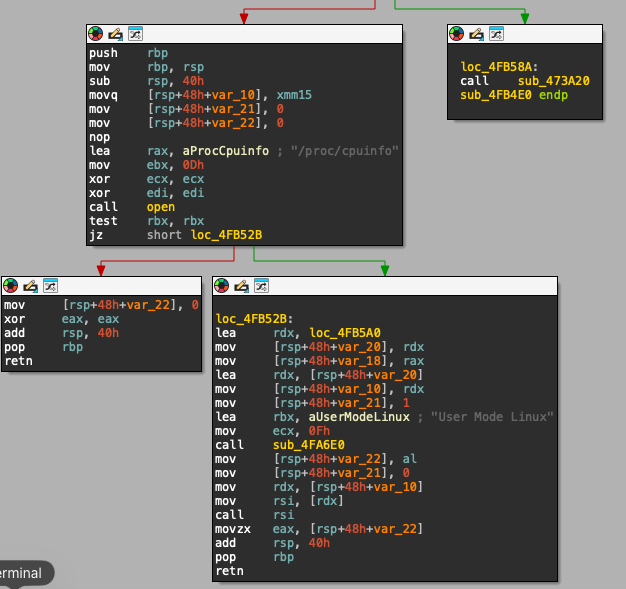
After renaming the functions and having a general idea I go back to the main function. And we can see that after the function mw_cpu_info we have a test instruction, so I guess that it just tries to open the file to gather info and based on that it can exit the binary depending on the checks
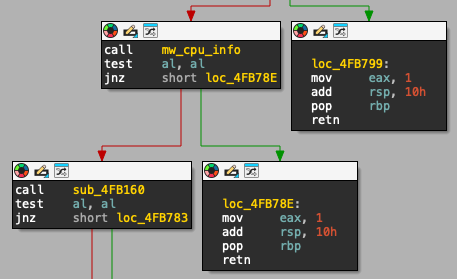
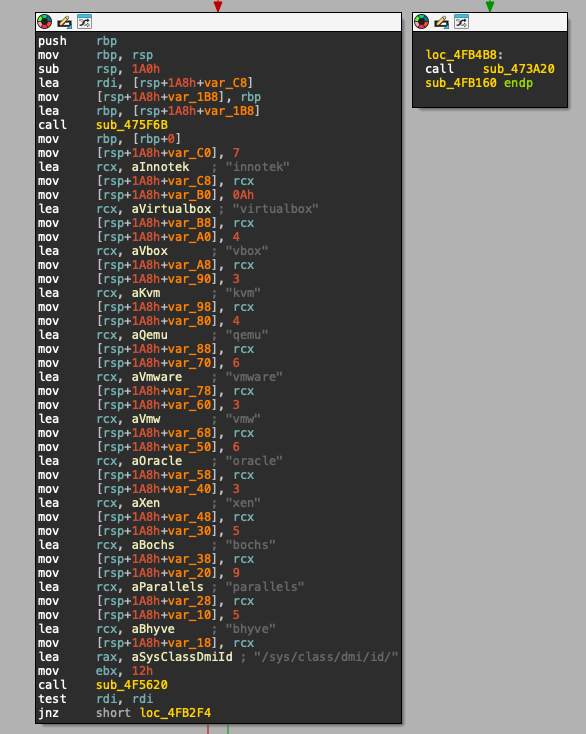
After jumping to sub_4FB160 I see a big block of code that has a lot of strings that are related to VMs and at the end a filesystem looking string that is at the very end of the block "/sys/class/dmi/id/"
The
/sys/class/dmi/id/directory is a Linux sysfs interface that exposes human-readable hardware identification information extracted from the system’s SMBIOS/DMI tables by the kernel.
Question 5
I spent some thing analyzing a lot of functions that appear to be other hardware checks, parsers, and stuff that handles switch cases. I went back to the main function. I renamed the function to mw_call_antidebug.
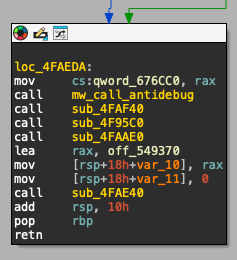
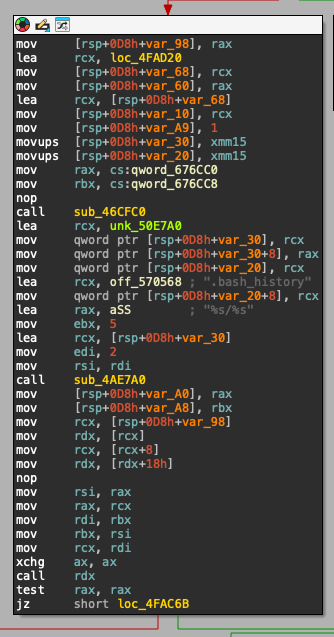
Now let’s see the other functions calls that are used after the mw_call_antidebug. First the function sub_4FAF40 has multiple strings that are not obfuscated, this time the string mentions .profile, %s/%s and &.
.profile: This may indicate a possible persistence mechanism%s/%s: This is a common pattern that is used for string manipulation&: Indicates that this might execute other process on the background
This is related to the challenge description, so I will be skipping this one.
a strange line of code was found in the .profile file of the facility’s computers, which secretly starts an unknown process.
If we jump to the next function call (sub_4F95C0) we can see the following:
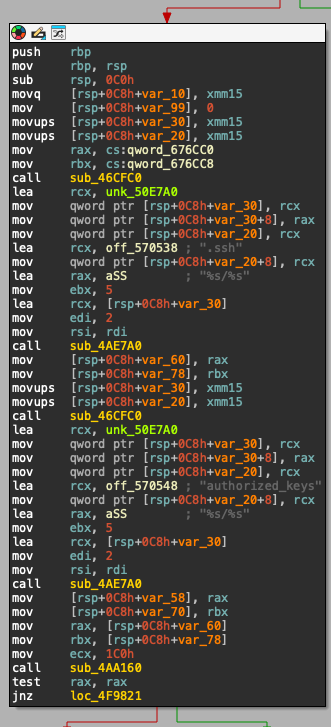
Right away we can see these strings .ssh, .authorized_keys and the same pattern I mentioned before %s/%s. The reason why we want to pay attention to this is because it looks like a remote persistence mechanism to allow the malicious actors to connect remotely with ssh keys
.ssh: Directory that is used by ssh and is located on~/the user home directory..authorized_keys: File that holds ssh keys that have the permissions to be used to remotely connect to the server%s/%s: Same pattern used for string manipulation
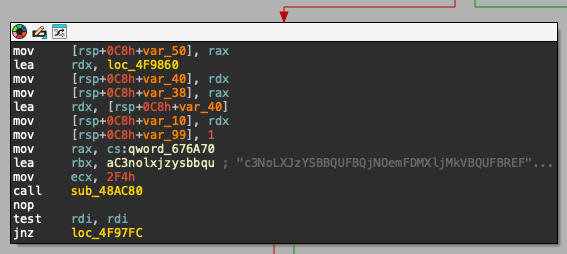
If we scroll a little bit, we can see the use of a ssh key, so I will go to the reference, to try to extract it.
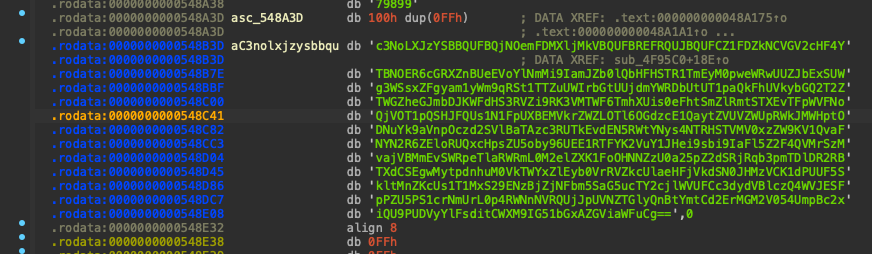
1
2
3
4
5
6
7
8
9
10
11
12
'c3NoLXJzYSBBQUFBQjNOemFDMXljMkVBQUFBREFRQUJBQUFCZ1FDZkNCVGV2cHF4Y'
'TBNOER6cGRXZnBUeEVoYlNmMi9IamJZb0lQbHFHSTR1TmEyM0pweWRwUUZJbExSUW'
'g3WSsxZFgyam1yWm9qRSt1TTZuUWIrbGtUUjdmYWRDbUtUT1paQkFhUVkybGQ2T2Z'
'TWGZheGJmbDJKWFdHS3RVZi9RK3VMTWF6TmhXUis0eFhtSmZlRmtSTXEvTFpWVFNo'
'QjVOT1pQSHJFQUs1N1FpUXBEMVkrZWZLOTl6OGdzcE1QaytZVUVZWUpRWkJMWHptO'
'DNuYk9aVnpOczd2SVlBaTAzc3RUTkEvdEN5RWtYNys4NTRHSTVMV0xzZW9KV1QvaF'
'NYN2R6ZEloRUQxcHpsZU5oby96UEE1RTFYK2VuY1JHei9sbi9IaFl5Z2F4QVMrSzM'
'vajVBMmEvSWRpeTlaRWRmL0M2elZXK1FoOHNNZzU0a25pZ2dSRjRqb3pmTDlDR2RB'
'TXdCSEgwMytpdnhuM0VkTWYxZlEyb0VrRVZkcUlaeHFjVkdSN0JHMzVCK1dPUUF5S'
'kltMnZKcUs1T1MxS29ENzBjZjNFbm5SaG5ucTY2cjlWVUFCc3dydVBlczQ4WVJESF'
'pPZU5PS1crNmUrL0p4RWNnNVRQUjJpUVNZTGlyQnBtYmtCd2ErMGM2V054UmpBc2x'
'iQU9PUDVyYlFsditCWXM9IG51bGxAZGViaWFuCg=='
Now if this is not clear enough, what we have here is a Base64 encoded string. You can tell this is the case because at the very end of the string we have the classic == that indicates this is a Base64 string. Now we need to decode it, why is really easy, just copy the string and use your terminal
1
2
$ echo "c3NoLXJzYSBBQUFBQjNOemFDMXljMkVBQUFBREFRQUJBQUFCZ1FDZkNCVGV2cHF4YTBNOER6cGRXZnBUeEVoYlNmMi9IamJZb0lQbHFHSTR1TmEyM0pweWRwUUZJbExSUWg3WSsxZFgyam1yWm9qRSt1TTZuUWIrbGtUUjdmYWRDbUtUT1paQkFhUVkybGQ2T2ZTWGZheGJmbDJKWFdHS3RVZi9RK3VMTWF6TmhXUis0eFhtSmZlRmtSTXEvTFpWVFNoQjVOT1pQSHJFQUs1N1FpUXBEMVkrZWZLOTl6OGdzcE1QaytZVUVZWUpRWkJMWHptODNuYk9aVnpOczd2SVlBaTAzc3RUTkEvdEN5RWtYNys4NTRHSTVMV0xzZW9KV1QvaFNYN2R6ZEloRUQxcHpsZU5oby96UEE1RTFYK2VuY1JHei9sbi9IaFl5Z2F4QVMrSzMvajVBMmEvSWRpeTlaRWRmL0M2elZXK1FoOHNNZzU0a25pZ2dSRjRqb3pmTDlDR2RBTXdCSEgwMytpdnhuM0VkTWYxZlEyb0VrRVZkcUlaeHFjVkdSN0JHMzVCK1dPUUF5SkltMnZKcUs1T1MxS29ENzBjZjNFbm5SaG5ucTY2cjlWVUFCc3dydVBlczQ4WVJESFpPZU5PS1crNmUrL0p4RWNnNVRQUjJpUVNZTGlyQnBtYmtCd2ErMGM2V054UmpBc2xiQU9PUDVyYlFsditCWXM9IG51bGxAZGViaW
FuCg=="| base64 -d
1
ssh-rsa AAAAB3NzaC1yc2EAAAADAQAB... null@debian
This reveals the name of the user for that ssh key and the name of the device, which in this case is Debian Linux.
Question 6
Now that we know that the strings are not decrypted at runtime I can just download a text file with all the strings that the binary has and I can run it against a grep with a ton of strings that are relevant or you can ask the AI to parse the strings to look for specific things.
You can save the strings to a file using Die from the strings view for later use on some other tool.
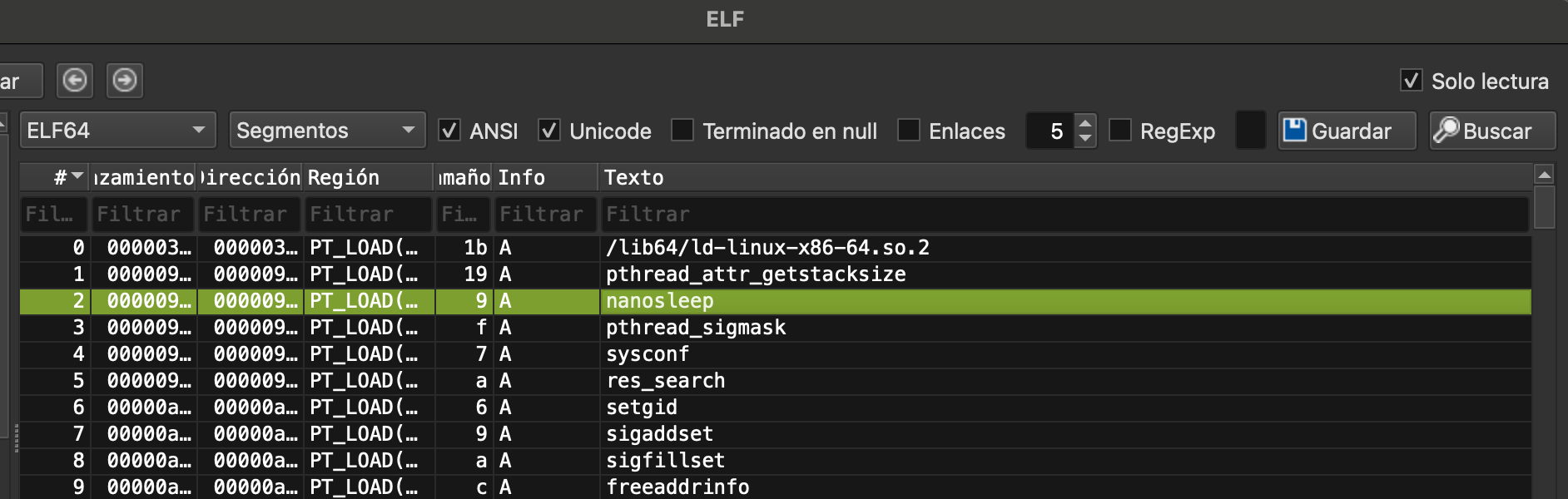
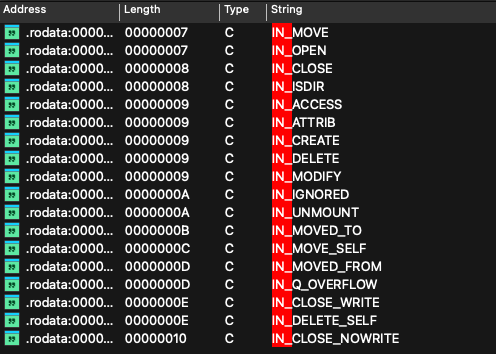
I used strings provided the Golang binary and used grep to search for the specific string that mentions IN_MODIFY, this string was flagged as something suspicious because it can be used to monitor file modification on Linux. You can search the documentation that mentions this specific string and this url had the answer
inotify - monitoring filesystem events IN_MODIFY (+) - File was modified (e.g., write(2), truncate(2)).
Now, we know that this is being used for notifications when a file changes.
1
2
3
4
5
6
7
8
9
10
11
12
13
14
15
$ strings antarctica.malware | grep IN_MODIFY

, size = bad prune, tail = newosprocrecover:  not in [ctxt != 0,
oldval=, newval= threads=: status= blocked= lockedg=atomicor8 runtime= sigcode= m->curg=(unknown)total < 0traceback}
stack=[ gp.goid= lockedm=244140625ParseUintcomplex64invalid nreflect: funcargs(bad indirInterfacerwxrwxrwxWednesdaySeptemberlocaltimeInheritedClassINETAuthorityquestionsIN_ACCESSIN_ATTRIBIN_CREATEIN_DELETE

IN_MODIFY

pclmulqdqmath/randtlsrsakexPgMajFaultCcNi3Kv3tyDTY3s7EvDkDXsDa0p0LvActiveAnonSUnreclaimITDVmVJE6E
SwapCachedStructTypeLV4iAnFpCOPageTablesS0mMLypsFVSelectCaseActiveFileXpMe1RCYhISwapDevicejw7Sux4SAJnmjL891tH0
structTypevirtualbox/dev/stdinreaddirent (deleted)pidfd_openpidfd_wait/etc/hosts

netGo = .localhostgetsockoptnetlinkribsetso
ckoptunixpacketowner diednotifyListprofInsertstackLargeNot
workermSpanInUseGOMAXPROCSstop tracedisablethpinvalidptrschedtracesemacquiredebug call flushGen  MB goal, s.state =  s.base()= heapGoal=GOMEMLIMIT KiB now,  pages at  sweepgen= sweepgen , bound = , limit =  returned ,errno=0}
We also have multiple other flags in the binary, not just IN_MODIFY.
If we follow the references that the string has then we end up on the function 0x4ED080, I renamed this to mw_notify. We see this:
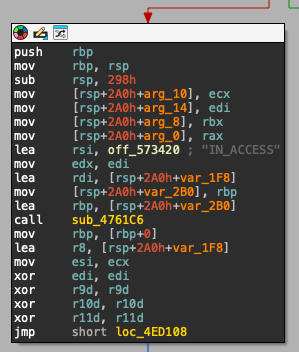
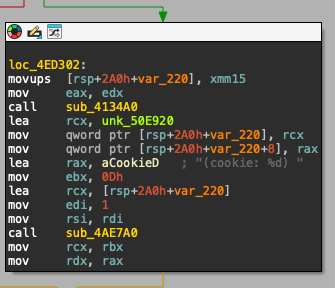
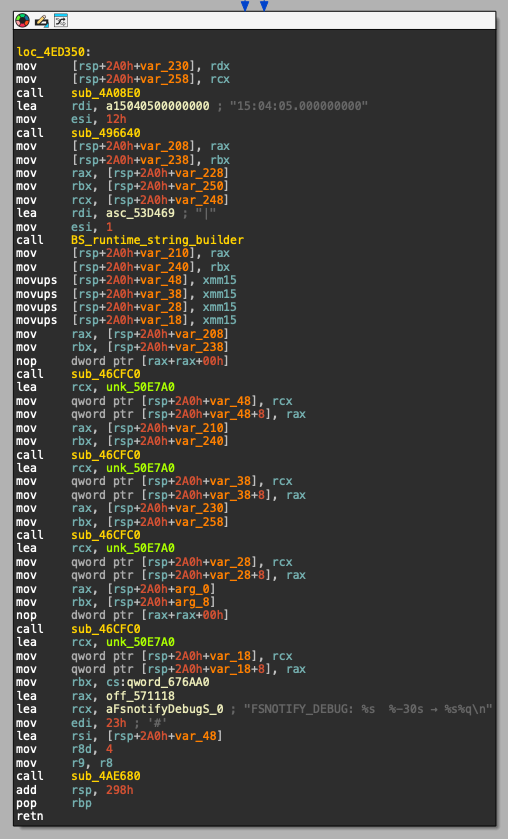
We have a lot of strings that at least to me look related host enumeration and/or debugging.
Maybe when we trigger the event IN_ACCESS, it gets a lof of debug info from the system and writes a debug message to log activity. If you search for the string "FSNOTIFY_DEBUG: %s %-30s → %s%q\n" you can find this Go package.
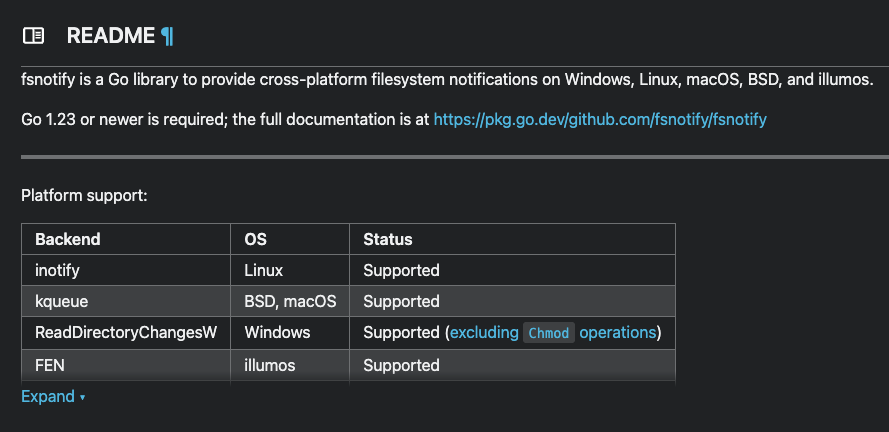
This is an open source golang package that is described as a “cross-platform filesystem notifications for Go”.
Question 7
After the call to mw_ssh_persistence we can find the next interesting call sub_4FAAE0, inside that function we can find a call to sub_4FAB40 which hold more strings