Reverse Challenge - EasyJerk
Now. This is an amazing challenge for a beginner. I will explain in detail the steps I take and why.
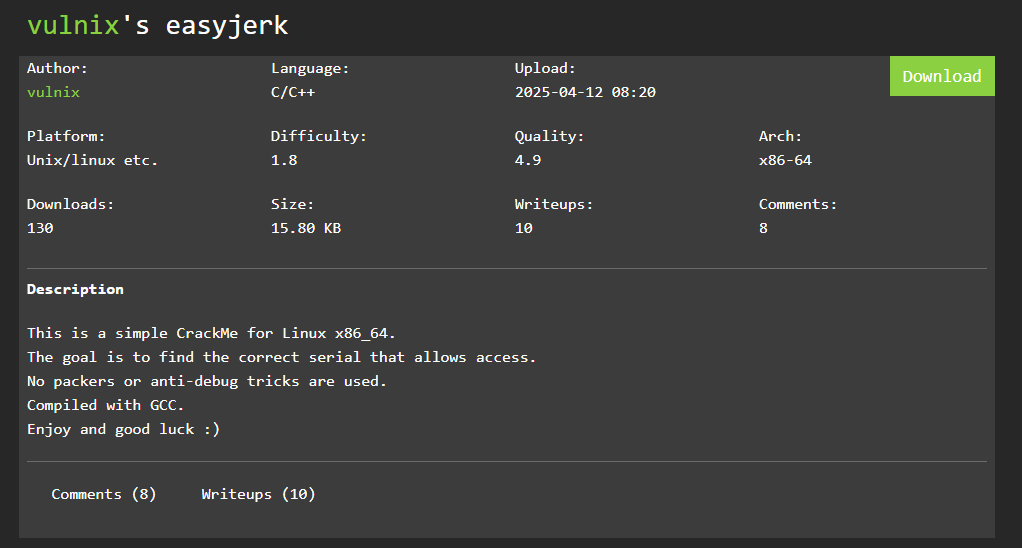
Crackmes
This is a website were you can upload/download software that is meant to be reversed engineered by anyone. It’s totally legal and expected to do so. It’s been running for a while now and it’s pretty well known in the community. Challenge link
The Challenge
I will be using a dissasembler, this is a specific tool that is used to reverse engineer software. There’s a lot of options, like Binary Ninja, IDA, Ghidra, Cutter and many more.
I will use Binary Ninja, you can use any other option I provided. All of them need a license to unlock a lot of features (just like everything nowdays), but they also have a free license you can use. If you’re looking for a free alternative you can use Ghidra.
First Look
If you read the description of the challenge you know that the binary was compiled with GCC and it was made for Linux x86_64. How can we found out this information without the description?
We can use multiple tools, but for this I will use Detect It Easy (DiE). This is very helpful as a first step to know what we’re going to deal with.
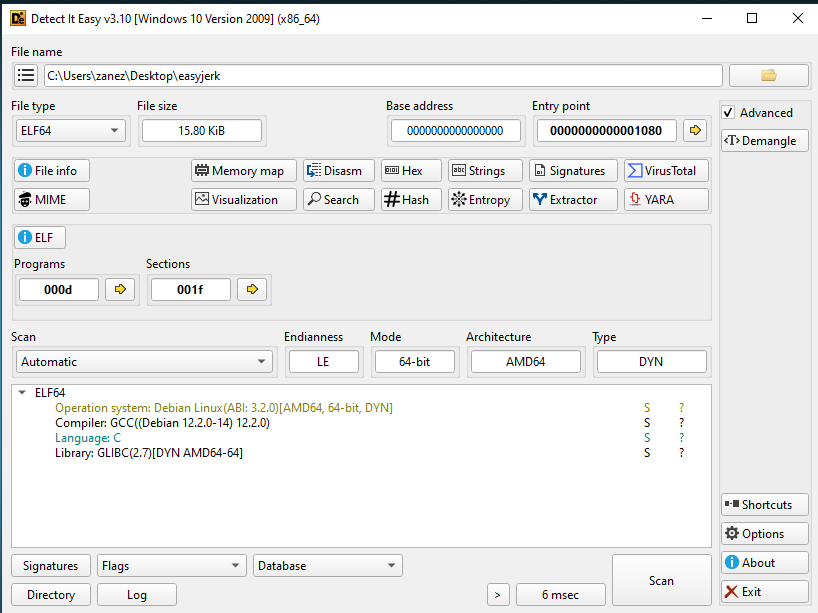
Thanks to this we know the following information about the binary:
- Compiled with GCC
- Binary was made with C
- Made for Linux
- No packers
Analysis with Binary Ninja
Main function
Now, let’s open the binary with Binary Ninja. This will be the decompiler I’m going to use for this article. Binary Ninja offers multiple ways to view the source code of this binary:
- Disassembly
- Low Level IL
- Medium Level IL
- High Level IL
- Pseudo C
- Pseudo Object C
- Pseudo Rust
- Other Advanced IL Forms
After we open the file I’m analyzing the main function of the program. We can see the following inside this function
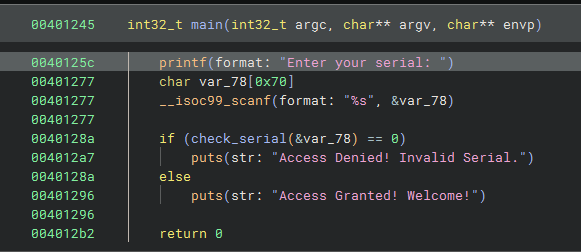
The first line of the code is a printf function that will show the message Enter your serial on the terminal. The next two lines are just to be able to take the input the user is going to provide.
It creates a string of size 0x70 (112) and then uses the function scanf to take the input and store in the variable var_78.
Then it does an if statement to check the input string that was provided by the user, checks if the function check_serial with the input from var_78 returns 0. If that’s true then it prints Access Denied! Invalid Serial. if not it prints Access Granted! Welcome!.
Then the next strep is check the function check_serial because that’s the main login behind the program to verify the string.
Check Serial function
Now, we can see that the next function is a little bit more complex, but we can rename some of the variables here to make it more readable.
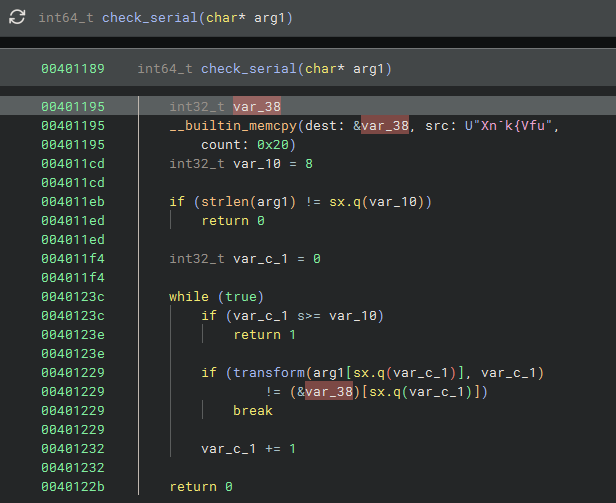
But first I’m going to change from High Level IL to Pseudo C, because it looks a little bit cleaner when it comes to the code.
For example:
1
sx.q => int64_t
You can find it here:
1
if (strlen(arg1) != (int64_t)var_10)
Which means that the variable var_10 must be a int64_t, is a signed 64-bit integer type with an exact, fixed size of 64 bits (8 bytes).
Now, let’s rename the variables:
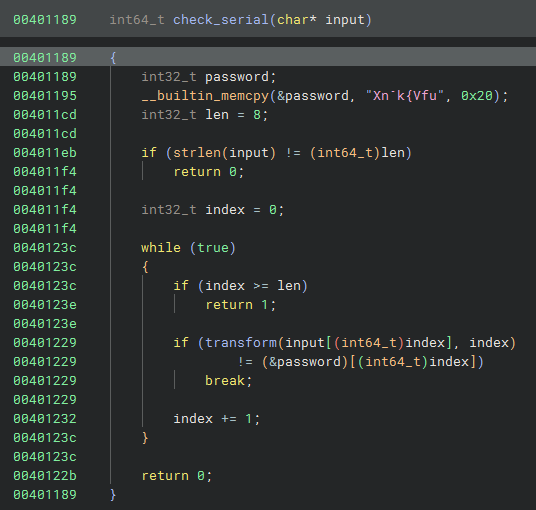
I changed the following variables:
| Old names | New names |
|---|---|
| var_38 | password |
| var_10 | len |
| arg1 | input |
| var_c_0 | index |
The variable arg1 was changed to input because as I mentioned before the function check_serial is used to check the input that the user provided.
I changed var_10 to len because, there’s this snippet where the binary checks for the length of the string and uses var_10 for the check.
1
if (strlen(arg1)) != (int64_t)len)
The variable var_c_0 was changed to the name index because it is used on a loop to iterate over two strings to compare them:
1
2
3
4
5
6
7
8
9
10
while (true)
{
    if (index >= len)
        return 1

    if (transform(input[(int64_t)index], index) != (&password)[(int64_t)index])
        break ++;

    index += 1;
}
Here we can how it is used for the string input.
1
input[(int64_t)index]
The last variable is var_38 thas was renamed to password. We can see on the following snippet:
1
if (transform(input[(int64_t)index], index) != (&var_38)[(int64_t)index])
After the transform function trasformed a characted from the variable input then it compares the result with the character at the same position with the variable var_38. If one character is not the same it will return 0 and it will print Access Denied! Invalid Serial.
Which means that it’s making sure that both strings are exactly the same, so this indicates that it is the password.
Transform function
This function is in charge of taking both strings and doing some calculations on each character and returning the character.

Reverse Transform
We can reverse the operation just like a math problem, here’s the transformation using the code provided in the binary:
1
2
3
4
5
out = ((input ^ (index + 7)) + 0xd) & 0x7f
out ≡ (input ^ (index + 7)) + 0xd        (mod 128)
out − 0xd ≡ input ^ (index + 7)          (mod 128)
(out − 0xd) & 0x7f ≡ input ^ (index + 7)
((out − 0xd) & 0x7f) ^ (index + 7) = input
This takes us to the following reversed function. Know that I have the function, I will create a python script that will use it to revert the password.
1
ch = ((input - 0xd) & 0x7f) ^ (index + 7)
This script is similar to the binary we were analyzing. Instead of providing input I just put the password that we identified previously, I do the same loop and compute each character but I use the previous function.
1
2
3
4
5
6
7
8
9
10
11
12
13
14
15
def transform(input, index):
    ch = ((input - 0xd) & 0x7f) ^ (index + 7)
    print(chr(ch))
    return(chr(ch))

password = "Xn`k{Vfu"
len_str = 8
index = 0

while(True):
    if index >= len_str:
        break

    transform(ord(password[index]), index)
    index += 1
1
2
3
4
5
6
7
8
L
i
Z
T
e
E
T
f
1
2
3
4
5
X value in hex is 58.

58 - 0xD = 4B
4B & 0x7f = 4B
4B ^ 7 = 4C
4C is 76 in decimal, and the value 76 in ASCII is L.
Now you can execute the original binary and pass the string we got as the input and we will be able to received the Access Granted! Welcome! string.